iManage Work helps you to conveniently access all your matter subscriptions in the Tree View in iManage Work Web.

You can easily show or hide these subscriptions from the tree and rearrange their display order to suit your preferences.
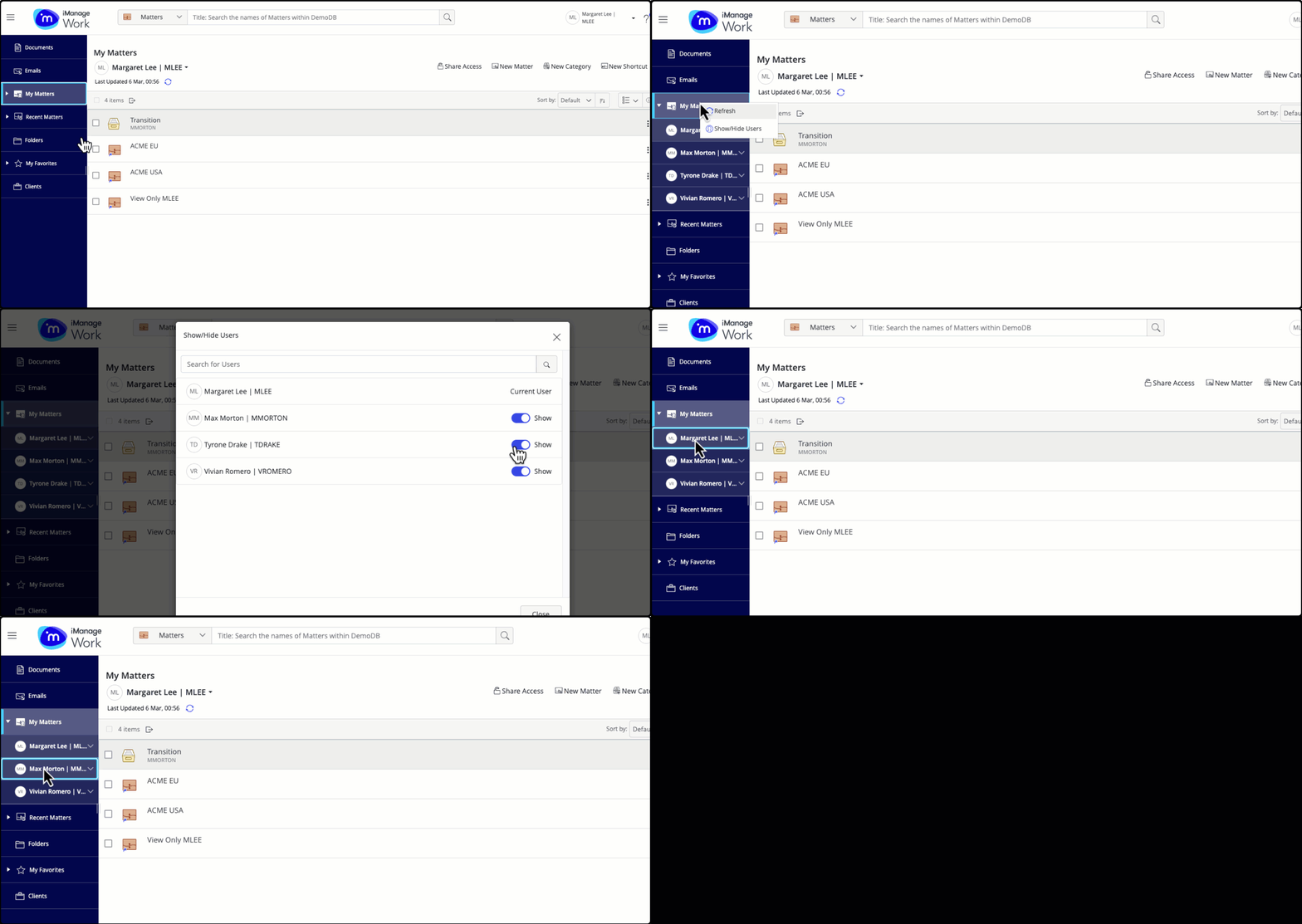
My Matters subscriptions on the tree.gif

Based on the node selected under My Matters in the tree, the options available differ as explained in the table below:

Table: Options available based on the selected node

Node selected

Options available

My Matters

  • Refresh

  • Show/Hide Users

User

  • Refresh

  • Share Access (Available to the logged-in user only)

  • New Matter (Available to the logged-in user only)

  • Hide user

  • Move up (Not visible on the logged-in user node)

  • Move down (Not visible on the logged-in user node)

  • New Category

  • New Shortcut

Category

  • Refresh

  • Copy Link

  • Move

  • Delete

  • Properties

  • Security

Workspace

  • Refresh

  • Add to My Favorites

  • Folder Upload

  • Remove from My Matters

  • Copy Link

  • Move Shortcut

  • New Folder

  • Properties

  • Security