You can now determine which applications can access and open files in iManage Drive. This feature lets you to allow or deny certain applications from accessing content in iManage Drive. You can also take a more conservative approach if required and only grant select applications the rights to access iManage Drive content by using the following configuration setting:
NOTE: If the windows_native_driver is set to cloud_filter, then explorer.exe is the application that is considered as the program that is used to open files from Explorer context menu. Hence, we recommend that you consider this before add the explorer.exe to hydration_alllow_list or hydration_deny_list accordingly.
hydration_allow_list_enabled: Administrators must set this configuration setting to true if they want only the applications defined in thehydration_allow_listconfiguration setting to open files from iManage Drive directory.hydration_allow_list: Allows administrators to specify the list of applications that can open documents from the iManage Drive working directory. If an application isn't specified in this configuration setting, when thehydration_allow_listis enabled, then the application can't open the documents from the iManage Drive directory.Example:
hydration_allow_list:- winword.exe- excel.exe- acrord32.exe- powerpnt.exe- explorer.exe
NOTE: The explorer.exe process is responsible for copying files using Microsoft Windows Explorer. Hence, we recommend that you consider this before configuring the hydration_allow_list or the hydration_deny_list.
hydration_deny_list: specify the list of applications that you don't want open or access documents from iManage Drive directory at any time.
Example:hydration_deny_list:- cmd.exe- explorer.exe
The following programs are denied access to files in iManage Drive by default, and we recommend that these settings shouldn't be modified.
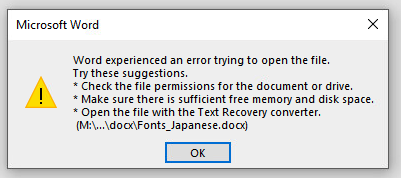
If users attempt to open a document from iManage Drive using an application listed inhydration_deny_list, then an error message is displayed indicating that the application can't open the document. For example, if Microsoft Word is added to the deny list as follows, hydration_deny_list: winword.exe, then when users open any document using Microsoft Word, they get the following error.
system_hydration_deny_list: In some circumstances, the Microsoft Malware Protection Engine executable (msmpeng.exe) doesn't allow you to open documents from iManage Drive although the executable is added to the deny list. To troubleshoot this issue, removemsmpeng.exefrom thesystem_hydration_deny_listadmin setting available in the admin_settings.yaml file as shown below.
Example:system_hydration_deny_list:- imanagedrive.exe- searchprotocolhost.exe- ccmexe.exeAdditionally, set the
ignore_windows_defender_process_when_hydratingtofalseto disable the ignoring of themsmpeng.exeprogram when hydrating on Microsoft Windows.