Next Generation Co-authoring provides an automatic conversion option that converts legacy binary files (.DOC, .XLS, and .PPT) to XML files (.DOCX, .XLSX, and .PPTX) and save them as new versions, so you can edit them in co-authoring mode provided you're using iManage Work for the Web (cloudimanage.com).
This feature lets you convert legacy files and make them available for co-authoring without leaving iManage Work for the Web.
Select the
 icon at the right of the row containing the legacy file you want to edit.
Select Open to expand the menu, then select Edit (Co-author) in MS Word for the web.
The Convert document dialog automatically displays when the file is a binary file.Figure: Open > Edit(Co-author) in MS Word for the web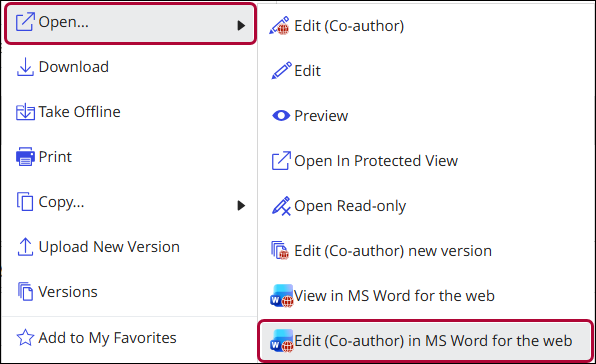
In the Convert document dialog, select Convert & Edit to convert the document to the XML version of the file.
Figure: Convert document dialog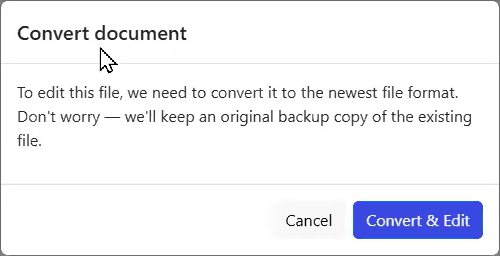
NOTE: The iManage Work panel on the right of the browser, shows the properties of the file on the Properties tab. After selecting Convert & Edit, select the Versions tab, and you'll see the new version that's been created with the XML version of the document, as shown in the below figure.
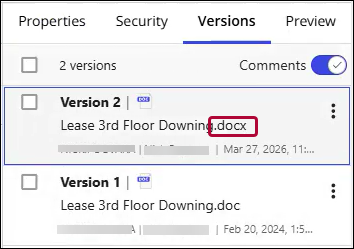
To edit the file in co-authoring mode, do either of the following:
Open the file for editing from the Versions tab.
Select Edit (Co-author) in MS Word for the web from the Open menu.