After you sign in, Forms designer opens by default. The UI elements of Forms designer are displayed in Application Designer.
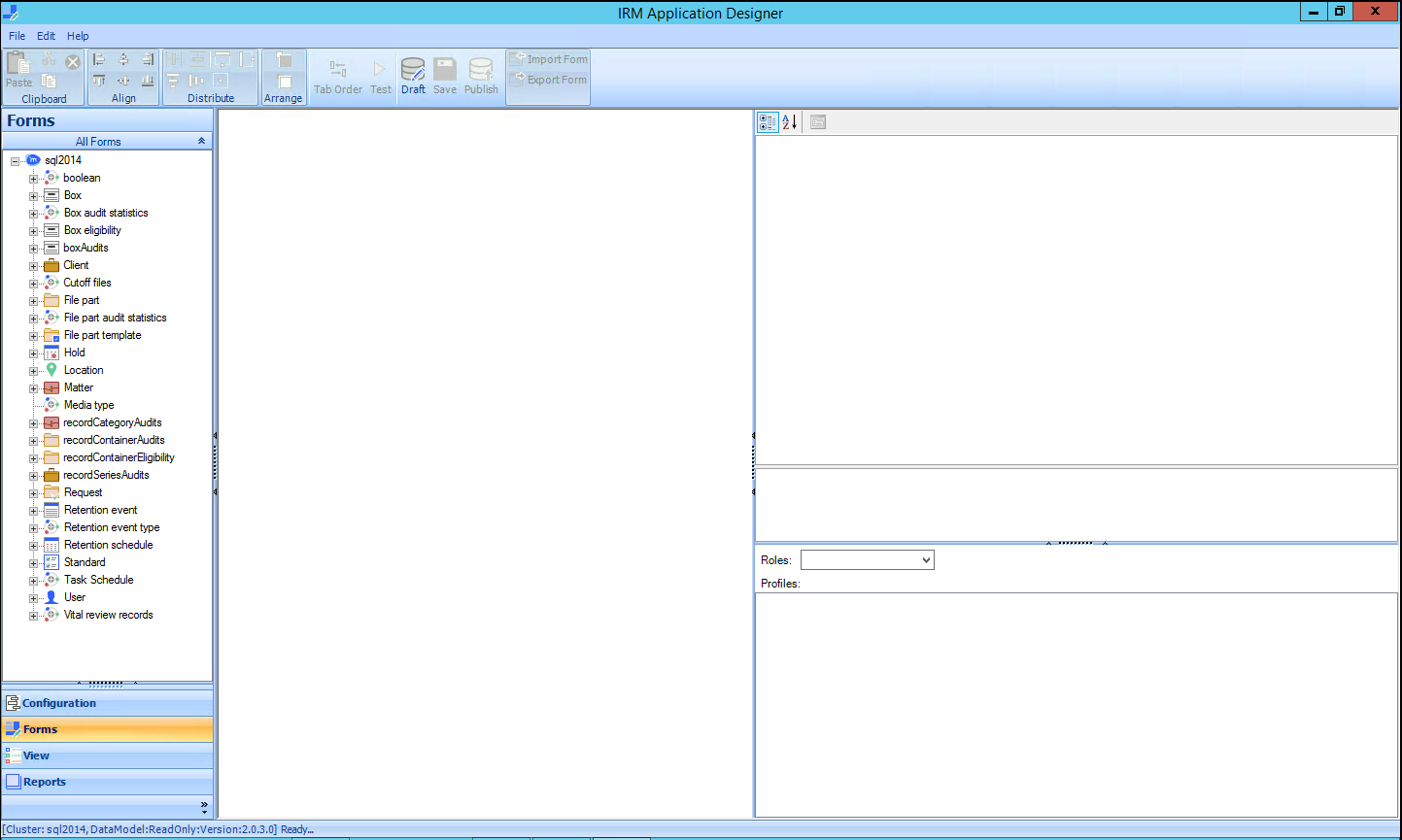
Each component in Application Designer is used to perform a certain set of functions. The Application Designer components and their primary functions are described as follows:
Forms: Forms designer is used for creating new forms and modifying or customizing existing forms that are used by IRM Desktop Clients for Records Managers and IRM Desktop Client for Users.
Reports: Reports designer is used for creating new reports based on templates and modifying or customizing existing reports. The changed or customized reports are saved and published to the server. These reports are then accessed from IRM Desktop Client for Records Managers and IRM Desktop Client for Users.
Views: Views designer is used to make certain properties available for selection to view in the Records Manager client applications.
Configurations: This section of Application Designer enables you to work with the following areas:
Edit Components: This section enables you to set properties of a specific system component as required. You can also register or unregister property relations here.
Captions: This section is used for modifying the existing global and application captions used by Records Manager.
Images: This section is used to add new or modified images to the server.
Report Settings: This section enables you to manage report formats, configure hot link reports, upload external assembly, and manage export formats.
Menus: This section enables you to manage the menu settings in IRM Desktop Client for Records Managers and IRM Desktop Client for Users.