Locations provide a hierarchical representation of available locations for file parts and boxes in an organization. With hierarchical locations, you have the ability to manage a file room down to an exact spot. The location hierarchy should be granular enough to locate information, but not complex to maintain. If the location hierarchy is too complex, it is difficult to manage and update with acceptable consistency. Regular auditing may be required to ensure that files are found where they are expected to be.
Figure: Location hierarchy diagram
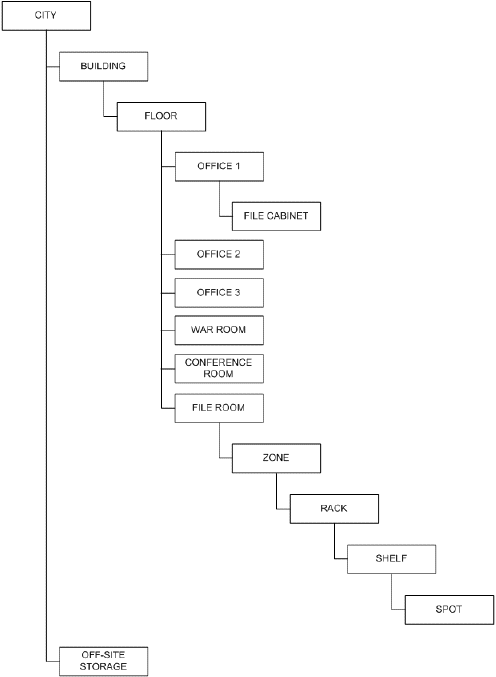
Note the following when setting up locations:
In a single-office firm, the top of hierarchy could be the floor(s) of the building. It isn't recommended to go beyond the floor or office level. The application can adjust the location hierarchy as the firm grows, but ensures not to add levels before they are actually needed.
In a multiple-office firm, at the least, there is a hierarchy level for multiple cities with possibly multiple offices in each city. Therefore, the hierarchy goes deeper down to the individual location level. However, ensure not to add more depth than necessary.
Off-site storage locations could also be added to the location hierarchy.
Specify a barcode ID for a location rather than using a system-assigned ID. For example, for the 27th Floor Central File Room in Chicago, specify the barcode ID as “CHI27CFR”, rather than using a system-assigned ID such as “00245845”. Having a human-readable barcode ID helps in validation when processing thousands of records.
For information on setting up locations, refer to Manage Locations.