From the search type drop-down list, select Emails.
Select inside the search box and enter the desired search input.
Use the scope and the language drop-down list to predefine the search scope and search language.
Figure: Performing simple search for emails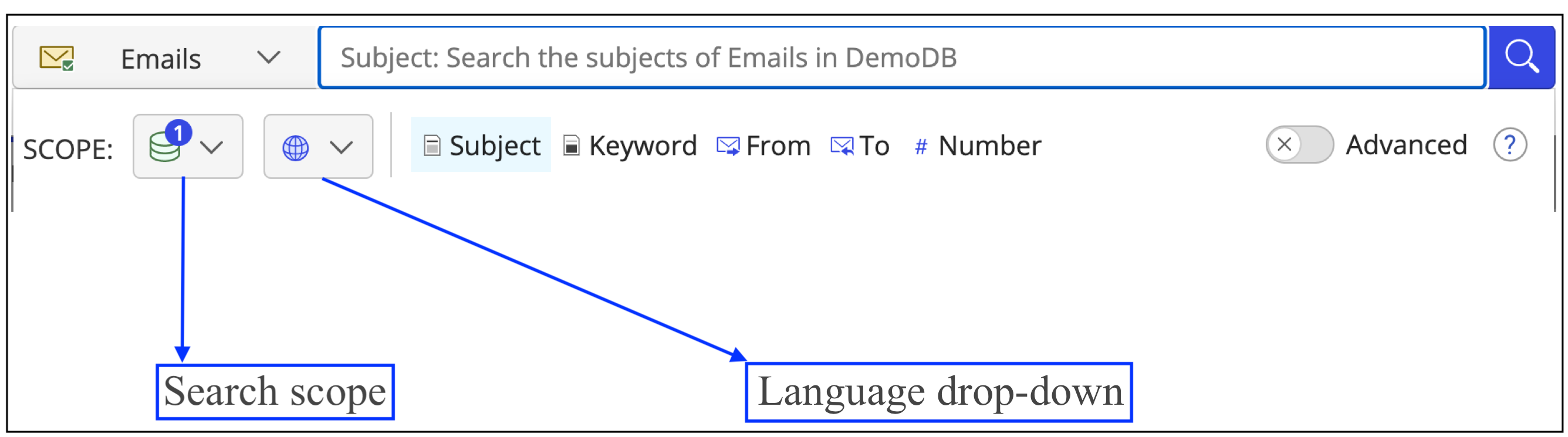
Select one or more of the following predefined fields to search for:
Subject (Refer to Performing a simple search against title or keyword for more information)
Keyword
From
To
Number
Press the Enter key. The results display the emails that meet your search criteria.
Searching for emails with numbers in or as the title
When you perform a search with a numeric value as the search criteria, then the numeric value is considered the Title or Keyword and the search results returned contain emails with numbers in or as their title.
From the search results page, you also have the option to run a document number search for emails with the same numeric value.