iManage Work Mobility 10.23.0 and later provides an easier method for editing iManage Work documents right from your iOS device. This capability is called Edit in place.
TIP: To see a demonstration of this new capability, view this video in the iManage channel on YouTube.
Edit in place is supported only for Managed Devices. When using iManage Work Mobility as a Managed App (MAM), users can still edit the document and save it as a local copy. The copy can then be uploaded to iManage Work.
In Intune, if the policy is applied to both managed and unmanaged devices, you cannot use Edit in place.
Target to apps on all Device Types | Edit in place support? |
|---|---|
Yes | No |
No (Unmanaged) | No |
No (Unmanaged and Managed) | No |
No (Managed) | Yes |
Configure the App protection policy
To use the Edit in place feature, you must configure Intune to apply the policy as described in Configure iManage Work Mobility for Intune as a Managed App.
To configure the App protection policy:
Select Apps > App protection policies and then select the policy you created.
In the Data protection properties ensure that Send org data to other apps is set to Policy Managed with OS Sharing.
Figure: Setting the app protection policy to send org data only to policy managed apps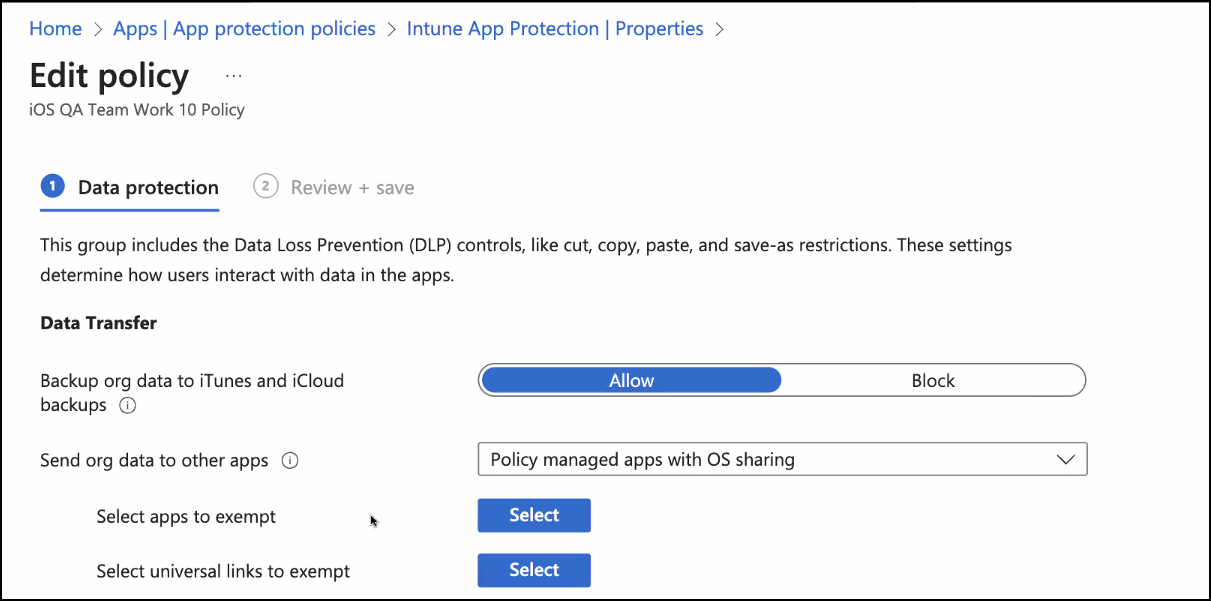
Select Save.
Continue with the following sections to create a filter for managed apps, and then apply it to your App protection policy.