Data security and privacy
Q: Can administrators view the MCP session details of other users?
A: No. The MCP session details page at https://cloudimanage.com/mcp/web/ displays only your own sessions—the sessions during which you connected to iManage using iManage MCP Server. Administrators cannot use this page to view or monitor the sessions of other users.
Each user can only view, manage, and delete their own sessions. This is by design: The session management page is a personal security tool that lets you review your own MCP activity and revoke access if you suspect unauthorized use of your account—for example, in the event of device theft.
For more information, refer to the Accessing your session details section in iManage MCP Server Help.
Q: What happens to our data if we discontinue using iManage MCP Server?
A: When iManage MCP Server access is revoked, all tokens are immediately destroyed. No client data is retained by the MCP system. Your data remains securely within your iManage environment.
Q: How does iManage MCP Server handle highly sensitive or classified documents?
A: iManage MCP Server maintains all existing iManage access controls and permissions. If a user doesn't have access to a document in iManage, they won't have access through iManage MCP Server.
Q: How do we audit AI assistance activity through iManage MCP Server for regulatory compliance?
A: iManage MCP Server provides comprehensive audit logs, which record all AI interactions with documents, through the Document History timeline. These logs include timestamps, user information, and details about AI assistance provided, supporting regulatory compliance and potential discovery requirements.
Q: Is there a way to track who accessed documents in iManage Work by using MCP-enabled clients?
A: Yes. Two MCP connector tools add a timeline entry to a document in iManage Work when a user accesses it through an MCP-enabled client. The following table lists these tools and the corresponding timeline entries.
Table: Timeline entries for activities using MCP-enabled clients
Connector | Tool | Timeline entry |
|---|---|---|
iManage Work |
| Downloaded version <number> using iManage MCP Service |
iManage Search |
| Viewed version <number> using iManage MCP Service |
Each timeline entry includes the following details:
Action performed (Downloaded or Viewed)
Document version number
Name of the user who performed the action
Date and time of the action
Channel through which the action was performed (iManage MCP Service)
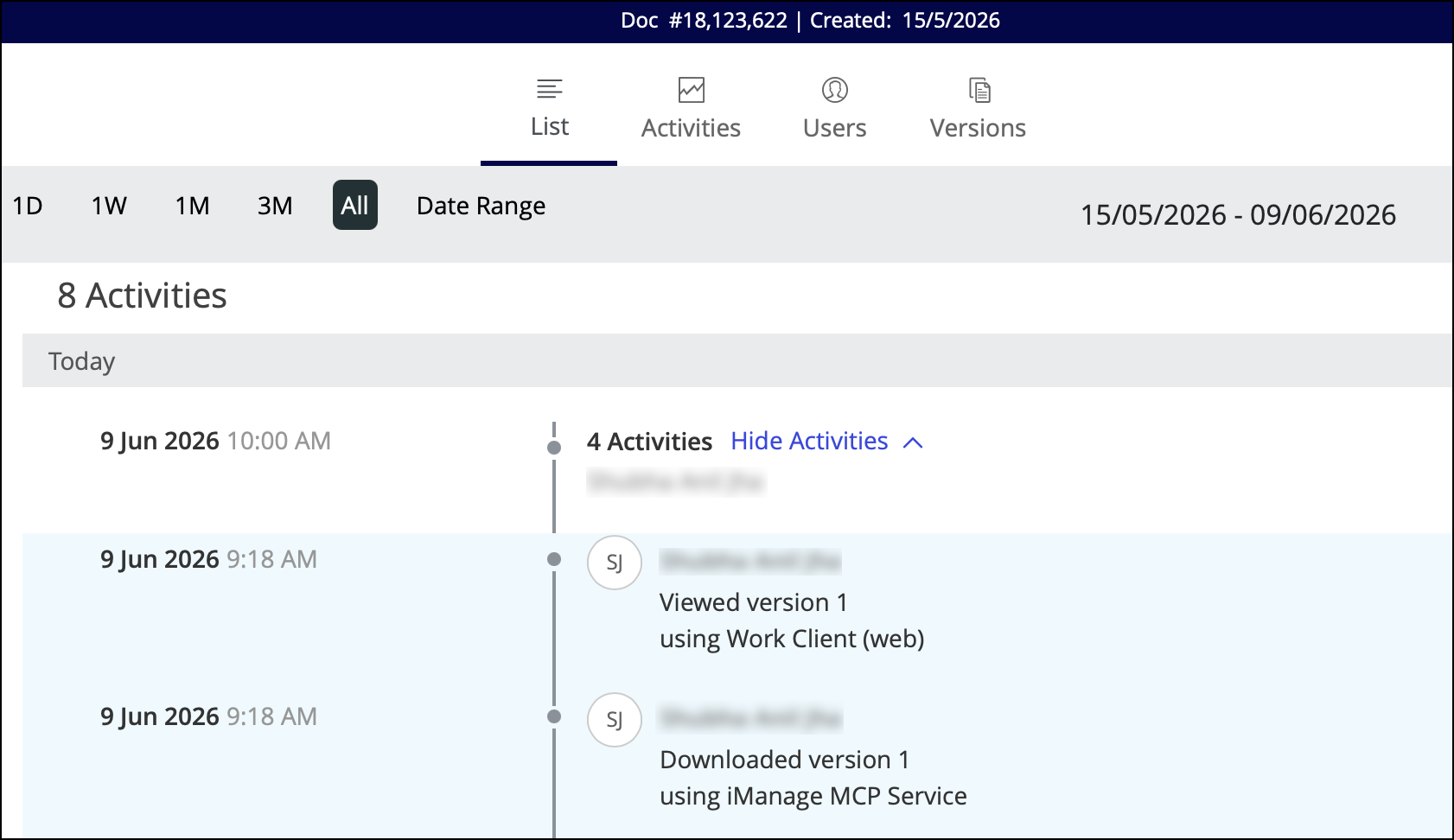
For more information about accessing the document timeline, refer to the Viewing a document's timeline section in iManage Work Help.
NOTES:
For the write tools in the iManage Work and iManage Search connectors, all document-related actions, such as moving a document, uploading a document or its profile, will be recorded in the document timeline.
Workspace and Folder activities are not tracked in iManage Work Web and the same behavior applies when using the iManage MCP Service.
No entries are added for the activities performed using the tools available for the iManage Tracker and iManage Insight+ connectors, as they only retrieve information and don't download, upload, or modify document content or profiles.
Technical and operational
Q: Does iManage control the quality or accuracy of responses generated by MCP-enabled clients?
A: No. iManage MCP Server provides MCP-enabled clients with secure, governed access to your iManage content. However, the responses generated from that content are entirely determined by the AI model in use. The quality, accuracy, and behavior of those responses depend on the model provider and the specific model version selected, not on iManage.
iManage has no control over how AI models interpret, summarize, or present the content they retrieve from iManage Work. Different models and different versions of the same model may produce different responses from the same iManage content.
Administrators should set appropriate expectations with users: iManage MCP Server governs what content the AI can access and ensures that access respects iManage security controls and permissions, but it doesn't influence what the AI says about that content.
Q: Can we restrict iManage MCP Server access to specific groups or teams?
A: Yes. Administrators can control iManage MCP Server access on a per-user basis through Control Center. Organizations can implement access policies that align with their practice structure and security requirements.
Q: What are the bandwidth and infrastructure requirements for iManage MCP Server?
A: iManage MCP Server leverages your existing iManage Cloud infrastructure and doesn't require additional on-premises hardware. The system operates efficiently within normal business network bandwidth constraints, with temporary increases during document processing activities.
Q: Can users access iManage MCP Server from mobile devices and external networks?
A: iManage MCP Server access follows the same security policies as your iManage environment. If users can securely access iManage from mobile devices or external networks through your existing security controls, they can access iManage MCP Server using the same authentication and security framework.
Q: Can developers build custom MCP-enabled clients that connect to iManage MCP Server?
A: Yes. iManage MCP Server supports the OAuth 2.0 Dynamic Client Registration (DCR) Protocol (RFC 7591), which allows your custom MCP-enabled client to register itself with iManage MCP Server and obtain the credentials it needs to connect—without requiring manual configuration by an administrator.
iManage MCP Server also exposes OAuth 2.0 Authorization Server Metadata (RFC 8414) endpoints, which your client can use to discover all authorization endpoints automatically at runtime.
NOTE: iManage MCP Server accepts only HTTPS-based redirect URLs during client registration. HTTP redirect URLs are not supported, including in local development or testing environments such as MCP Inspector.
For more information about building custom clients and the available OAuth protected resource endpoints, refer to Building custom MCP-enabled clients for iManage MCP Server.
For more information about DCR, go to https://modelcontextprotocol.io/specification/2025-03-26/basic/authorization#dynamic-client-registration.
Q: Why does the connection between Microsoft Copilot Studio and iManage MCP Server frequently disconnect, requiring users to re-authenticate?
A: The re-authentication requirement is determined by Microsoft tokens, not iManage tokens. Microsoft Entra ID issues non-persistent tokens that expire after 24 hours of inactivity. Because the iManage agent runs in the user context, which is required by the iManage security model, it can't silently re-authenticate. As a result, users may be prompted to re-authenticate.
To reduce the frequency of these authentication prompts, configure the following session controls in a Microsoft Entra Conditional Access policy:
Sign-in frequency: 7 days
Persistent browser session: Always persistent
NOTE: If an administrator republishes the agent in Microsoft Copilot Studio, all existing user sessions are cleared, regardless of the Conditional Access Policy settings. Users must authenticate again after every agent republish.
Settings and configuration
Q: Can I use the iManage MCP Service URLs to add a custom connector?
A: Yes. You can use these URLs to add connectors even if your company uses a subdomain.
For more information about adding custom connectors, refer to the Adding iManage connectors for MCP-enabled clients section in iManage MCP Server Help.