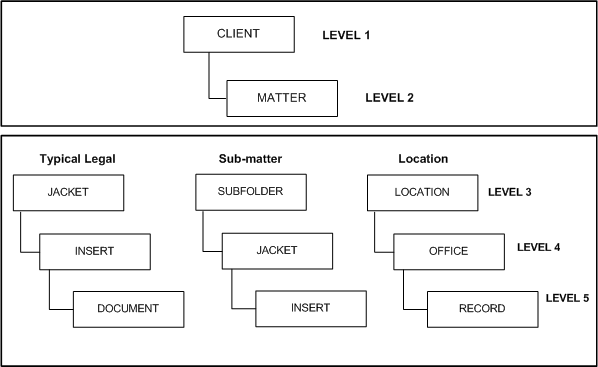
Law firms are document-intensive enterprises. To bring order to their records, law firms developed a file plan. Most law firms use a hierarchical approach to their file plan. The first level represents the clients and the second level represents the client’s matters. They're defined as metadata and aren't used for actual records. The subsequent levels represent the file parts of an individual matter. File parts normally correspond to both the physical containers and the electronic workspace of a matter.
The depth of file part levels corresponds to the file plan of a particular law firm. For example, some law firms have open filing, and so need only one file part level— the folder level. Other law firms use redwelds to keep files upright on the shelving, but do not use it to further organize folders. While other law firms use redwelds to separate different file types within a matter. For example, a Correspondence redweld may only contain Correspondence folders.
Some law firms also create a level between the matter and the file part called the sub-matter. The sub-matter is normally used for subdividing an especially large matter, which involves multiple practice areas.
Levels are added below clients and matters by creating file parts and defining them with custom media types. The file plan hierarchy has the flexibility to be configured in various ways.
Figure: File plan hierarchy
Note the following when defining the file plan:
In a single-office firm, the file plan is fairly straightforward, consisting of a basic hierarchy of clients, matters, and file parts.
In a multiple-office firm, the file plan could use sub-matters, or an office-based filing system.
If the file plan uses sub-matters, find out how iManage Work workspaces are organized, and how the time and billing system handles billing for the matter. If there is one workspace and billing number for the matter, the file plan also needs to retain this organization.
If additional file plan levels are required at or below Level 3 of the file plan, ensure that this is implemented consistently across the entire file plan. For example, every matter could have at least one sub-matter.
Standardize file plan hierarchy across offices, because inconsistencies in file plan hierarchies can affect the generation of label reports. For example, office A uses redwelds at the top level and folders at the next level, and office B uses both redwelds and folders at the top level. In such a scenario, while it is possible to create multiple label reports for subsets of file parts, the label printing queue in the application becomes clumsy, as it is designed to accommodate a single label report. It's better to design labels that can be generated by a single report.
The file plan can be autogenerated leveraging the law firm's practice management system by building an ongoing data transfer using Software Development Kit (SDK) or Data Loader. For further information about performing this process, contact your application administrator.
For information on managing elements of the file plan, refer to Manage the File Plan.