This section introduces the core concepts and components involved in integrating iManage Threat Manager alerts into a Security Information and Event Management (SIEM) system. Integrating alerts into a SIEM enhances security by centralizing incident management, allowing teams to monitor, investigate, and respond to threats more efficiently.
Included is a high-level walkthrough of how alerts are accessed, authenticated, queried, and processed using the Threat Manager API. This section also covers alert types, authentication methods, pagination, error handling, and how to work with the sample integration resources provided in Threat Manager SIEM sample application.zip.
You can download Threat Manager SIEM sample application.zip from iManage Help Center.
In this section:
- Threat Manager alerts and SIEM integration overview
- Alert type limitations
- Authentication setup
- API endpoint format
- Sample API request and response
- Alert query parameters in Threat Manager
- Error handling
- Rate limits
- Pagination
- Alert link behavior
- Working with the Threat Manager sample ZIP
- SIEM sample Python code prerequisites
- Swagger documentation reference
Threat Manager alerts and SIEM integration overview
This section provides a high-level overview of integrating iManage Threat Manager alerts into a SIEM system. It covers alert type identification, authentication setup, alert querying, and API response handling.
Task: Integrate Threat Manager alerts into a SIEM
Determine alert type access
Behavior Analytics alerts: Accessible through
/getAlertListAPI using application token.Detect and Protect alerts: Require user sign-in authentication. Not accessible through an application token.
Set up authentication
Generate an application token and secret in Threat Manager.
Use them to obtain an access token through
POST /v2/login/api_token.
Query alerts
Use
POST /getAlertListto retrieve Behavior Analytics alerts.Customize the request payload with supported parameters such as date range, timezone, and sorting.
Process API response
Extract the following from each alert:
User metadata
Risk scores
Rule details
Alert links.
Use the
linkfield to navigate directly to the alert in Threat Manager.
Handle pagination and rate limits
Use
page_numandpage_sizeto manage large datasets.Respect rate limits (recommended: once per day per enabled user).
Reference API documentation
Use the
swagger.yamlfile (included in the SIEM sample ZIP) for endpoint specifications.Review the sample Python code for integration and testing.
Alert type limitations
The following describes which alerts are accessible through the API and how authentication affects access.
Behavior Analytics alerts
Accessible through
/getAlertListAPI.Require application token authentication.
Detect and Protect alerts
Not accessible through application token or
/getAlertList.Require user sign-in authentication (SAML, LDAP, or local)
Authentication setup
iManage Threat Manager APIs support two authentication methods:
Application token authentication
Used for Behavior Analytics alerts. Requires an application token and secret, which are used to obtain access token through POST /v2/login/api_token. Access is limited to POST /tm-api/getAlertList.
NOTE: The /getAlertList API only returns alerts from Behavior Analytics rules. Alerts generated from Detect and Protect rules are not accessible through this API because they involve automated actions and require user sign-in. This is by design.
User sign-in authentication
Required for Detect and Protect alerts. Uses iManage Work credentials (SAML, LDAP, or local). Grants broader access to Threat Manager features, including alerts that trigger automated actions.
Token lifecycle
Default expiry: 1440 minutes (1 day)
Maximum expiry: 525600 minutes (365 days)
Role dependency: Application tokens are tied to the Integration Manager role. If the role is removed or the user is disabled, all tokens created by that user become inactive. Tokens become active again when the role is re-added or the user is re-enabled.
API endpoint format
Use the following endpoint to query alerts:
POST https://<your-instance>.tm-cloudimanage.com/tm-api/getAlertListSample API request and response
The following example shows a sample request and its corresponding response.
Request
POST /getAlertListHeaders: { "X-Auth-Token": "<access_token>"}Body: { "timezone": "America/Chicago", "daterange_period": "last_month", "page_size": 20, "sort_field": "risk_score", "sort_order": -1}Response
{ "alerts": [ { "user_id": "jsmith", "first_name": "John", "last_name": "Smith", "practice_area": "Litigation", "location": "Chicago", "designation": "Associate", "manager_name": "Jane Doe", "timestamp": "2025-09-01T14:23:00Z", "risk_score": 87, "risk_score_details": { "activity": "Download", "count": 12, "mean": 4.5, "threshold": 10 }, "rule_id": "BA-001", "flag_status": "Flagged", "comments": "Unusual download activity", "review_status": "Pending", "link": "https://yourinstance.tm-cloudimanage.com/alert/12345" } ], "page_num": 1, "total_pages": 5}Alert query parameters in Threat Manager
The /getAlertList API supports query parameters that control how alerts are filtered, sorted, paginated, and exported. Use them to tailor requests to specific timeframes, user behaviors, rule IDs and risk levels, extracting only the most relevant data for your SIEM or reporting needs.
The following tables group the available /getAlertList query parameters into logical categories for easier reference and implementation.
Date and time parameters
Use these parameters to define the time window for alert retrieval. Timezone settings ensure alerts are interpreted correctly based on your region.
Parameter | Description |
|---|---|
| Specifies the date range for retrieving alerts. If |
| Timestamp (in milliseconds) for the start of the alert range. Used only when |
| Timestamp for the end of the alert range. Used only when |
| Timezone for interpreting date ranges and alert timestamps. |
Pagination and sorting parameters
Use these to manage large datasets and control sort order.
Parameter | Description |
|---|---|
| Page number to return from the result set. |
| Number of alerts per page. Maximum: |
| Primary sort field. Sorting cascades through up to four levels. |
| Sort direction. Use |
Filtering parameters
Use these parameters to narrow results based on specific criteria.
Parameter | Description |
|---|---|
| Case-insensitive substring search on user IDs and usernames. |
| Filters by review status. Examples: |
| Filters by flagged status. Examples: |
| Filters by whether comments exist. Examples: |
| Filters by rule ID. Accepts a list. Examples: |
| Filters alerts by severity threshold. |
| Filters by specific alert rule ID. |
| Filters by minimum risk level. Accepted values: |
Export parameters
Use these parameters to export alerts in bulk. Paging is disabled when exporting; all matching alerts are included in the file.
Parameter | Description |
|---|---|
| Returns all alerts in a downloadable file format. Disables paging. Examples: |
Error handling
The following describes common API errors and how to respond.
Common status codes
Code | Meaning |
|---|---|
| Invalid token or expired session. |
| Insufficient permissions. |
| Rate limit exceeded. |
| Server-side issue. |
Retry logic
Use exponential backoff for transient errors.
Retry up to 3 times for 5xx errors.
Don't retry on 4xx errors, except
429.
Rate limits
To avoid throttling:
Recommended frequency: Once per day per enabled user.
Avoid frequent polling.
Monitor usage to stay within limits.
Pagination
Use page_num and page_size to manage large datasets. Maximum page_size is 90.
Example:
{
  "page_num": 2,
  "page_size": 50
}
Alert link behavior
Each alert returned by the /getAlertList API includes a link field containing a unique URL to the alert detail page in Threat Manager. This enables direct navigation from SIEM dashboards to the alert in Threat Manager. An authenticated session is required to open the link.
Working with the Threat Manager sample ZIP
Threat Manager SIEM sample application.zip is available for download from iManage Help Center. It includes:
swagger.yaml (API documentation)
Python scripts for authentication and alert export
README file with setup instructions and usage guidance
Threat Manager SIEM sample application.zip 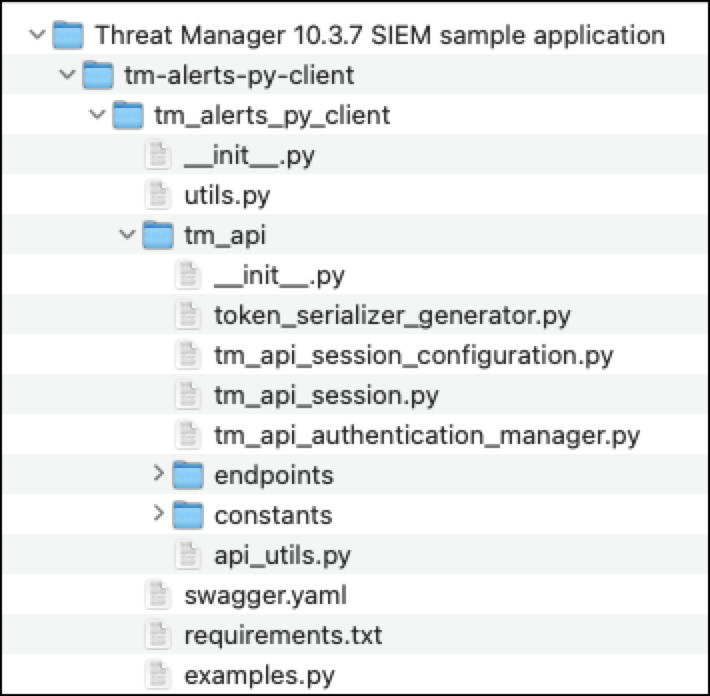
SIEM sample Python code prerequisites
This section describes what you need to run the sample Python code in Threat Manager SIEM sample application.zip. The scripts handle authentication, alert querying, and data export from iManage Threat Manager to your SIEM system.
System requirements
Language: Python 3.8+. Download from http://www.python.org.
Library:
requests
Authentication credentials
You need the following before running the scripts:
An access token (obtained using your application token and secret)
The endpoint URL for your Threat Manager instance. For example,
https://<your-instance>.tm-cloudimanage.com/tm-api/getAlertList
These credentials are required to authenticate and query alerts through the API.
Swagger documentation reference
The swagger.yaml file included in the Threat Manager SIEM sample application.zip contains full API specifications, including /getAlertList, request and response formats. You can view it in Swagger Editor or in Visual Studio Code with a Swagger plug-in.
For details on viewing the file, refer to Accessing the Threat Manager API documentation.