Install the module and connect to the Azure Administrator Account
This first procedure walks you through installing the module, the services, and then connecting to the Azure Administrator account. Make sure you have Windows PowerShell 7.0 or later installed. For details, refer to PowerShell—Verify version and update.
Open a Windows PowerShell (7.0 or later) window, and at the prompt, enter the command to install the Azure Account:
Install-Module -Name Az.Accounts -Force.At the prompt, enter the command to install Microsoft Graph:
Install-Module Microsoft.Graph -Scope CurrentUser.At the prompt, enter the command to install Microsoft Online Management:
Install-Module ExchangeOnlineManagement -Scope CurrentUser.At the prompt, enter the command to connect to Azure:
Connect-AzAccount.In the sign-in dialog, select the account you want to sign in with, and complete the sign-in procedure.
Azure will retrieve the subscriptions available on the tenant, and provide you with the name as in the example below.
Figure: Example input and feedback for installing and Connecting to Azure Admin account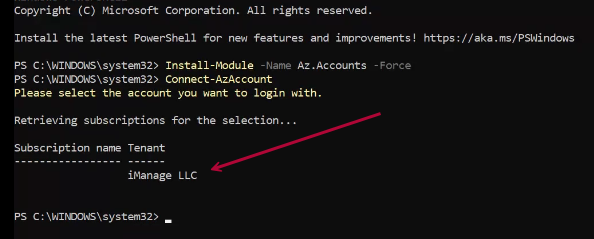
Install the Azure Resources
After connecting to Microsoft Azure, install the Azure resources module if it isn't already installed.
At the prompt, enter
Install-Module Az.Resources.When you are asked whether to trust the source and want to continue, enter
Y.