When you draft a new email, you have two options for opening the iManage Work task pane, where you can view the filing and attachment options:
On the Message tab of the ribbon, select iManage Work.
On the iManage Work toolbar at the top of the draft email, select Open filing options.
The options available in the iManage Work task pane are specific to the operations you'll want to perform when drafting emails, whether you're sending them with or without attachments:
Insert iManage Attachments—Opens iManage Work Web to locate files to attach
iManage Work filing options—Select from the email filing options
iManage Work filing locations—Provides Subscription View for you to select from mailboxes to which you have access and select from that set of locations for filing
Open Work for Web—Opens an instance of your or a shared iManage Work for additional filing locations not visible in the task pane.
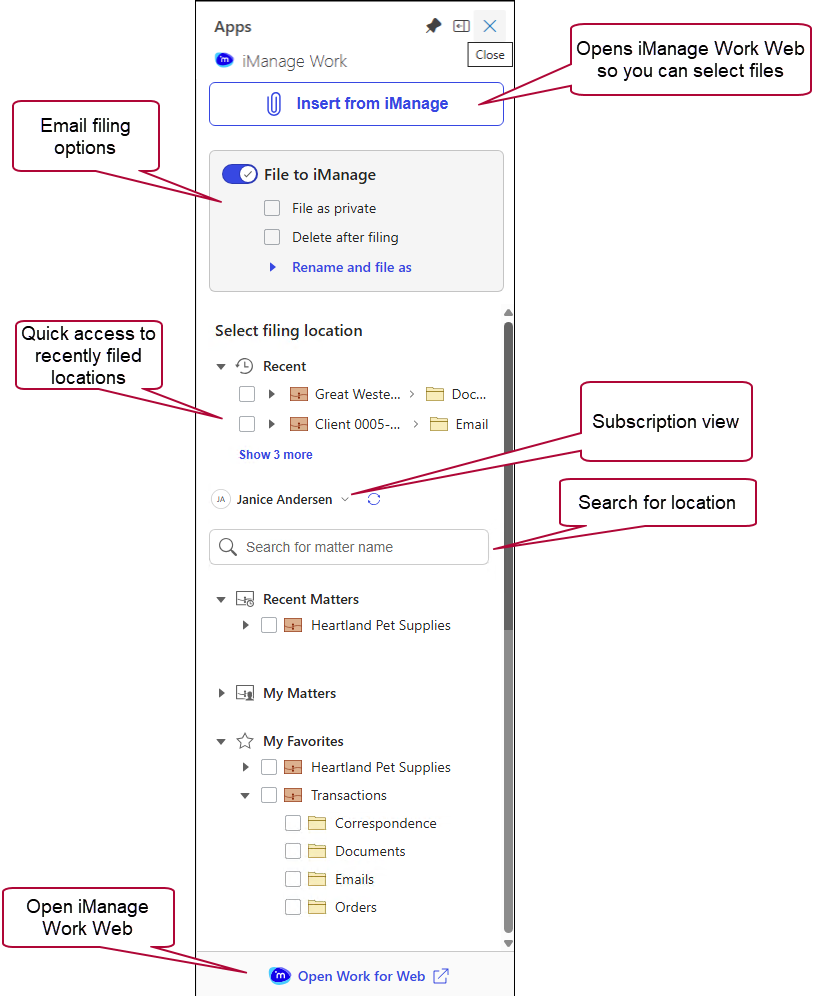
Figure: Insert iManage attachments task pane for draft emails