Connecting to iManage
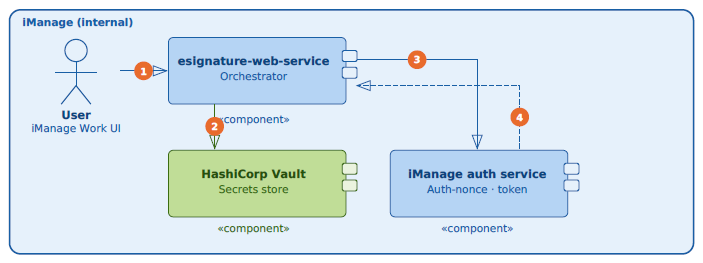
The user selects documents in iManage Work and selects Send to E-signature.
The iManage Work E-signature service retrieves its OAuth Client ID and Client Secret from a secure internal secrets store.
Using those credentials, iManage requests an authentication nonce from the iManage authentication service.
The iManage authentication service validates the nonce and issues an access token, stored securely in an HTTP-only cookie for the session.
Connecting to DocuSign
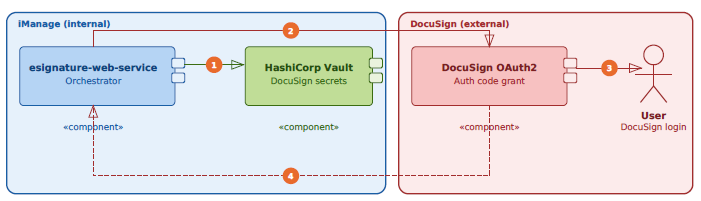
The iManage Work E-signature service retrieves its DocuSign partner application credentials from the same secure store.
The user is redirected to the DocuSign sign-in screen using those credentials. iManage has a single, DocuSign-verified OAuth2 application, so one Client ID and Client Secret cover all customers; no separate registration is needed on the customer's end.
The user signs in with their own DocuSign credentials.
DocuSign issues an access token back to iManage, stored in an HTTP-only cookie.
For configuring the Access Token Expiry and Allow Refresh Token settings, refer to Adding iManage Work E-signature to iManage Work in iManage Control Center.
Document upload and signing
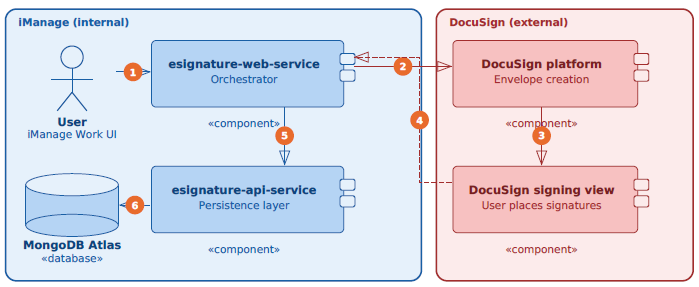
The user selects documents and sends them to E-signature.
NOTE: Document order isn't guaranteed when multiple files are sent together. DocuSign processes files based on file size rather than the order in which the files were selected.
iManage uploads the documents to DocuSign, creates an envelope, and registers a webhook to receive status updates.
DocuSign redirects the user to its signing view, where the user places signature markers and sends the envelope.
After the envelope is sent, DocuSign redirects the user back to the iManage dashboard.
The envelope metadata is saved to the iManage database.
Envelope status webhook
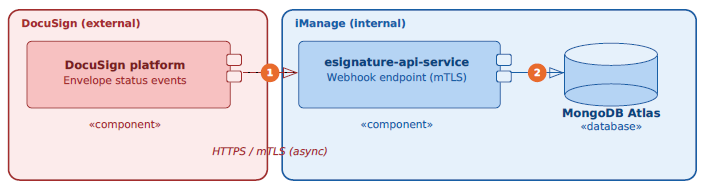
As the envelope progresses (viewed, signed, declined, voided, and other status changes), DocuSign sends status update events to iManage over a webhook endpoint secured with mutual Transport Layer Security (mTLS).
DocuSign must present a valid client certificate, and requests are only accepted over HTTPS. This certificate is shared across all iManage customers rather than being customer-specific.
To confirm a webhook belongs to the right customer, iManage attaches a unique JSON Web Token (JWT) to each customer's webhook callback URL. When a webhook arrives, iManage validates that JWT signature to confirm the callback is genuinely intended for that customer and that the URL hasn't been tampered with.
Each webhook delivers a full snapshot of the envelope at that point in time: All recipients, each recipient's status and action timestamp, and the base64-encoded PDF of the envelope's documents. The payload structure follows DocuSign's own documented JSON event schema, so exact fields can vary depending on how the envelope was configured.
After the envelope is complete, the signed document and the Certificate of Completion are filed back into iManage Work automatically, inheriting the destination folder's custom fields and security settings.
Who has access to the Client Secret?
The Client Secret is managed through iManage's internal secrets-management infrastructure and is never exposed in application configuration, logs, or customer-facing interfaces.