iManage AI Enrichment runs in the background, so you won’t see it actively working. This section explains what to look for to confirm it’s enabled, and what the enriched properties look like when you find them.
In this section:
Considerations
Keep the following in mind when checking whether iManage AI Enrichment is active:
iManage AI Enrichment properties are only visible when the application is enabled for your organization and your library is configured to display enriched properties. The enrichment service itself, when enabled, processes documents across all libraries; it can’t be limited to specific libraries. An administrator can, however, control which libraries actually display the resulting properties to users.
Although enrichment fields may be displayed in the UI within 20 minutes of enabling the application, backend services may take up to eight hours to become fully operational.
Where to look
You’ll know that iManage AI Enrichment is active in iManage Work if:
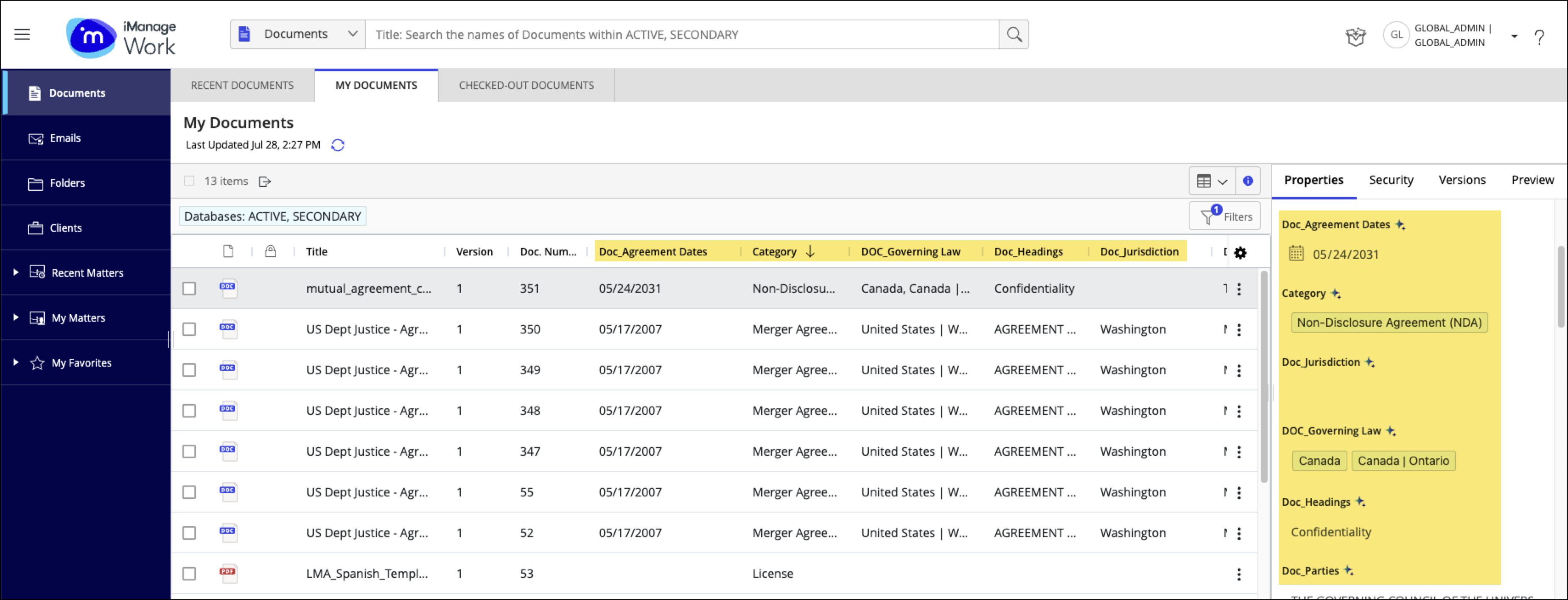
Additional metadata properties (such as document Category, Governing Law, or Jurisdiction) are displayed in the document Properties panel. AI-enriched properties in this panel are marked with the
 AI icon, indicating the value was generated by AI.
You have access to additional filters and options in Advanced Search.
AI-enriched metadata is also visible in Grid view, after you’ve added these properties to the view. They aren’t included by default.
What you’ll see
The AI-enriched properties are automatically populated by the system and marked with an AI icon. This visual indicator ensures that the metadata is recognized as enriched and allows the system to continue updating it as needed.
An administrator makes the core content properties (Category, Agreement Date, Parties, Governing Law, Jurisdiction, and Heading) available for selection. You then decide whether to display them in Grid view for easier access, visibility, and sorting. List view cannot be sorted by properties.
NOTES:
The administrative properties (Enrichment Date, Enrichment Status Code, and Enrichment Version) can't be added to Grid view. Additionally, don't add the Enrichment Disabled field because its values (Yes or empty) won't display as expected.
List view must be configured by an administrator.