The Overview tab on the Partner Portfolio Analytics page provides a consolidated dashboard of key portfolio metrics, including storage consumption, user licensing, and product subscription activity. Use this tab as a starting point to assess the overall health of your customer portfolio, identify usage trends, and quickly determine which customers may require follow-up. The dashboard helps you spot potential storage, licensing, or subscription concerns before they become issues.
NOTE: In this context, customer portfolio refers to your reseller-contracted customers who were live on cloudimanage.com during the selected billing period.
The Overview tab is organized into the following sections:
Portfolio Snapshot: This section features tiles that summarize customer, user, and storage metrics for your customers for the selected billing month.
Products: Updated daily, this section displays tiles that show subscription and activation metrics for the iManage products used by your customers.
This section includes the following topics:
Accessing the Overview tab
To view the Overview tab on the Partner Portfolio Analytics page in iManage Admin Portal:
Go to https://cloudimanage.com/admin/ and sign in with your iManage credentials.
Browse to Partner Portfolio > Partner Portfolio Analytics and then select the Overview tab.
The following figure shows an example of the Overview tab.
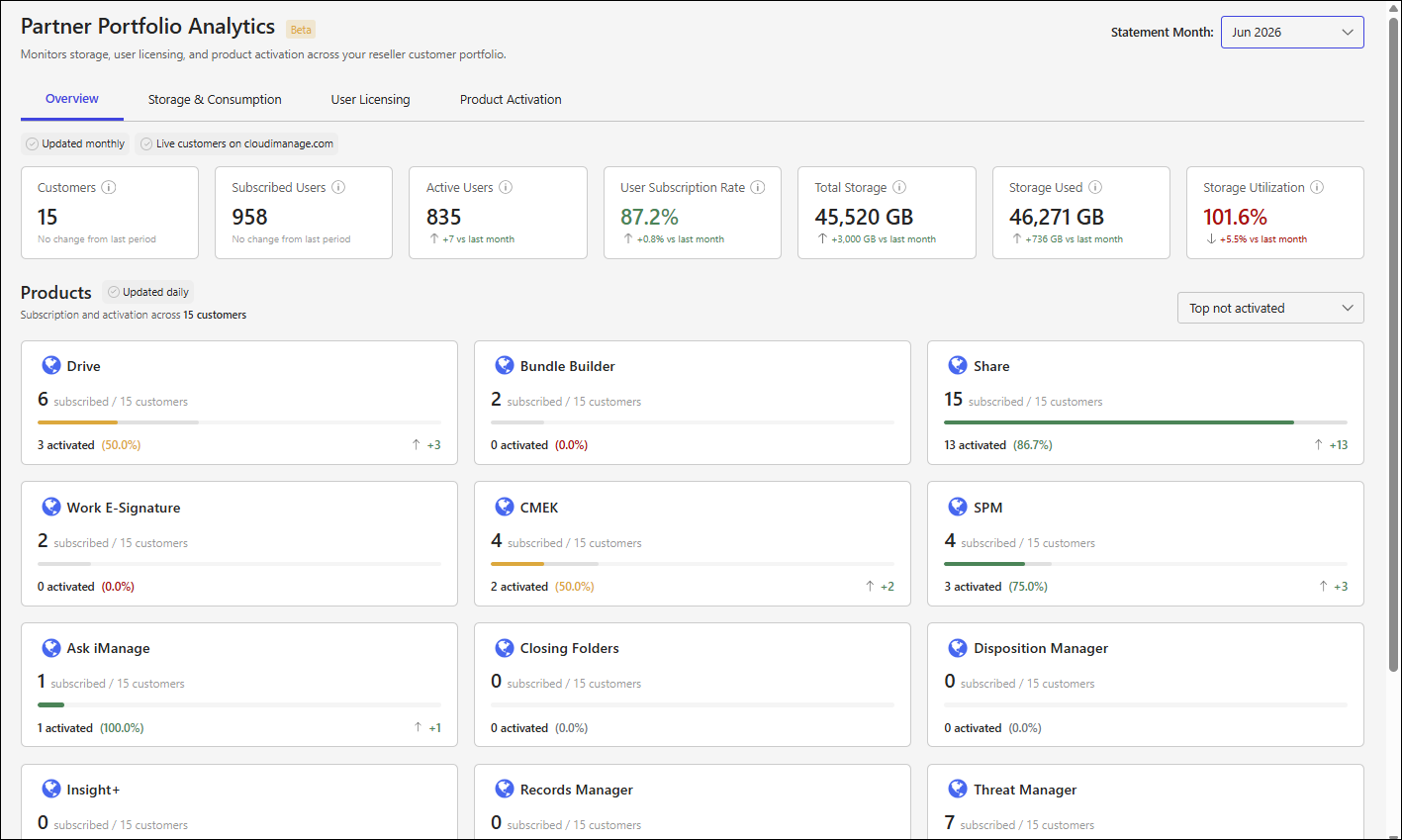
Overview tab sections
More information about the sections on the Overview tab is available in: