The Partner Portfolio Analytics page gives Partners a portfolio-wide view of customer usage, licensing, storage consumption, and product adoption. Use the page to identify trends, review customer-level details, and spot opportunities for follow-up, planning, or adoption support.
The page includes tabs for:
Overview: Summarizes key portfolio metrics such as storage, licensing, and subscription activity.
Storage & Consumption: Compares licensed storage with actual customer usage.
User Licensing: Shows licensing patterns and user counts across customers.
Product Activation: Highlights which iManage products are active and where adoption may need attention.
Partners can also access more detailed customer and product summaries to evaluate adoption across the portfolio.
Accessing the Partner Portfolio Analytics page
To view the Partner Portfolio Analytics page in iManage Admin Portal:
Go to https://cloudimanage.com/admin/ and sign in with your iManage credentials.
NOTE: To view the Partner Portfolio section, the user account used to sign in to iManage Admin Portal must be assigned either the Partner Portfolio Admin or Viewer role. For more information about granting user access, refer to Access Policy.
Browse to Partner Portfolio > Partner Portfolio Analytics.
The following figure shows an example of the Partner Portfolio Analytics page with the Overview tab selected.
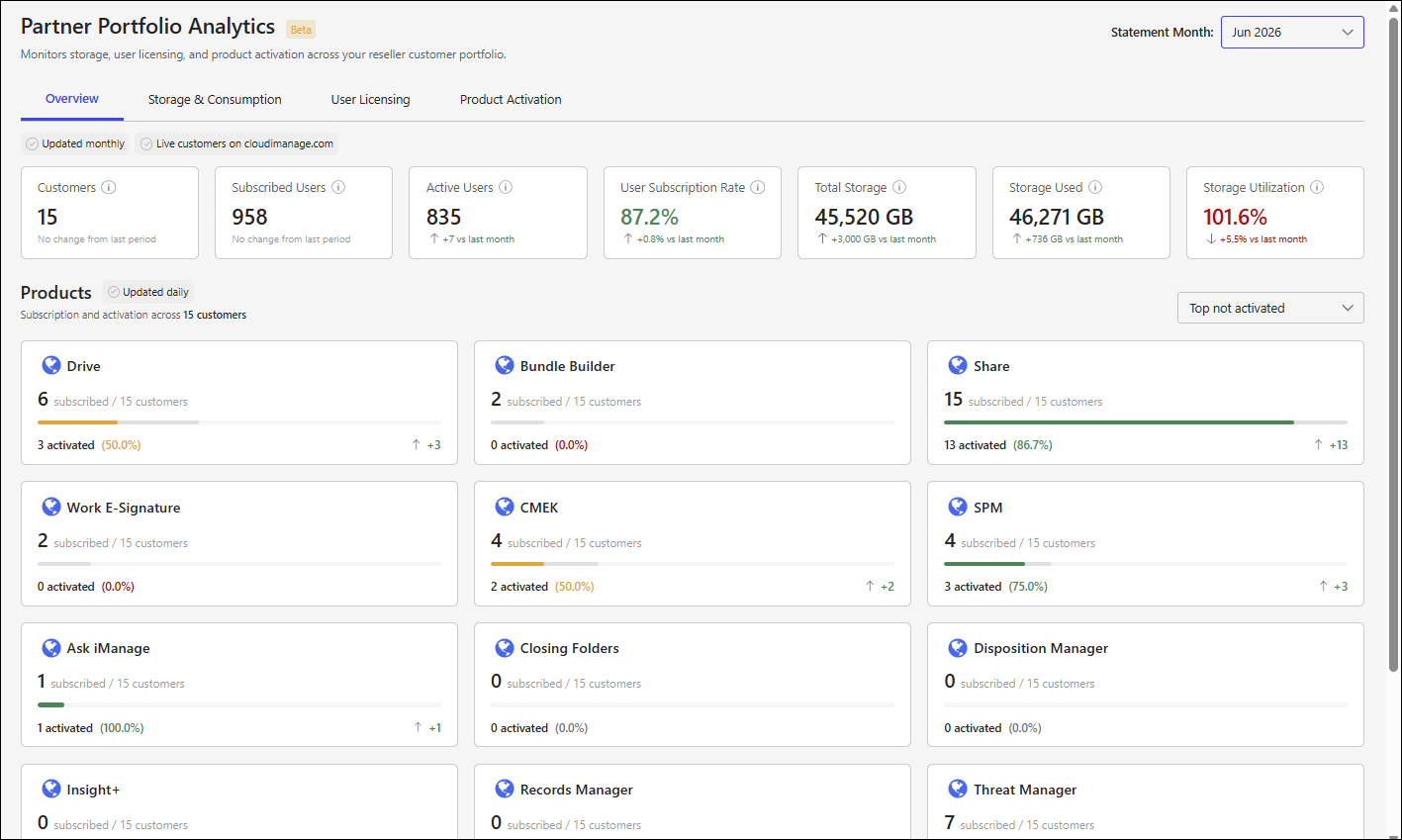
The Partner Portfolio Analytics page includes the following tabs, which provide in-depth details about your customer portfolio: