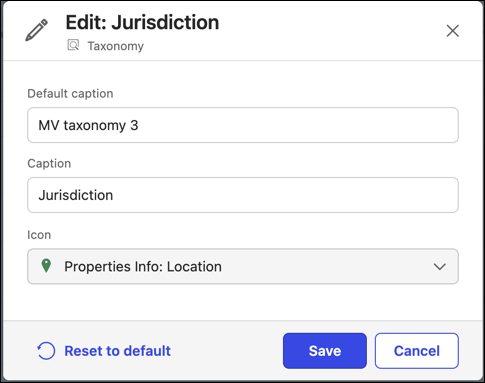
iManage Insight+ recognizes a property as the source for a Knowledge Collection field only when its caption matches one of the accepted terms listed below and its data type meets the field’s requirements.
Field | Required data type |
|---|---|
Jurisdiction | Taxonomy |
Topic | Taxonomy |
Industry | Taxonomy |
Practice area | Taxonomy |
Type | Taxonomy |
Work type | Taxonomy |
Governing law | Single-Value Lookup |
Language | Multi-Valued Lookup |
Use restriction | Single-Value Lookup |
Rules for captioning Properties
As an administrator, you must ensure to follow the below rules while captioning the properties:
Rules | Description |
|---|---|
Capitals, spaces, and punctuation are ignored | "Practice Area," "practice area," and "PracticeArea" are all the same captions. Use which suits best for users. |
Anything else isn't a match | "Practice Areas (UK)" doesn’t work. The extra wording makes it a different caption. Nothing is matched approximately. |
The data type must match exactly | A Lookup property captioned "Jurisdiction" won’t sync, as Jurisdiction needs to be a Taxonomy property. |
Only one property per field | If two properties carry a caption for the same field, none are synced. You must give different captions. |
English language only | Captions are matched only in English language. If you want to use captions in another language, contact iManage Support for direct configuration. |
Set this up before creating collections | Changing a caption after a Knowledge Collection is created doesn’t automatically resync the values already stored in it. |
Default properties used when no caption is set
For certain fields, iManage Insight+ Admin defaults to a recommended property when no caption is set. The table below lists these fields and their default properties.
Fields | Recommended Property ID | Default behavior |
|---|---|---|
Jurisdiction | mvTaxonomy3 | Syncs automatically |
Topic | mvTaxonomy2 | Syncs automatically |
Industry | mvTaxonomy5 | Syncs automatically |
Practice Area | mvTaxonomy7 | Syncs automatically |
Governing Law | mvLookup3 | Syncs automatically |
| — | The field remains empty until it’s captioned. |
Troubleshoot empty Settings fields
If a field on the Knowledge Collections Settings tab shows no values after configuration, check the following points in the same order to identify the issue.
If 30 minutes have passed since the caption was updated.
If the updated caption exactly matches the accepted term for that field.
If the property's data type matches the field's requirements.
If the property is captioned under Documents & Emails, and not any other category.
If a second property shares the same caption for that field.
If the property holds values.
If the issue persists after completing all the above checks, contact iManage Support with the field name and the Property ID.