The Reports tab on the Email page lets you generate and download reports related to iManage Work for Outlook. From this tab, you can create the following mailbox activity reports:
Filing history: This report provides the number of emails filed in all mailboxes using any filing method, grouped by day and mailbox, for the selected date range. It can be generated for up to the last 12 months.
Filing errors: This report provides the current number of emails with filing errors from all mailboxes, group by mailbox, error type, and filing method.
Linked folders: This report provides the current number of linked folders (including broken and inactive links) for all mailboxes, grouped by mailbox.
Activity history: This report lists the activities for the selected mailbox and date range. It can be generated for up to the last 60 days.
NOTES:
Completed reports expire after one week and are automatically removed upon expiration.
The time to generate a report can vary from a few seconds to several minutes, depending on the number of mailboxes, date range, and the number of reports being generated.
Completed reports are listed in a table on the Reports tab of the Email page. From this table, you can download or delete reports. When downloaded, reports are saved in CSV format.
Generated reports are listed in a table that includes the following details:
Type: The type of report.
Created by: The user who generated the report.
Date created: The date the report was generated.
Region: The region where the report was generated.
Expires on: The date the report will expire and be removed.
Status: The status of the report generation.
Completed: The report generation is complete.
Generating: A request to generate a report is being processed.
Deleting: A request to delete the report is being processed.
Download: The Download
 icon, which you can use to download the report.
Trash: The Trash
icon, which you can use to delete the report.
An example of the Reports tab is shown in the figure below.
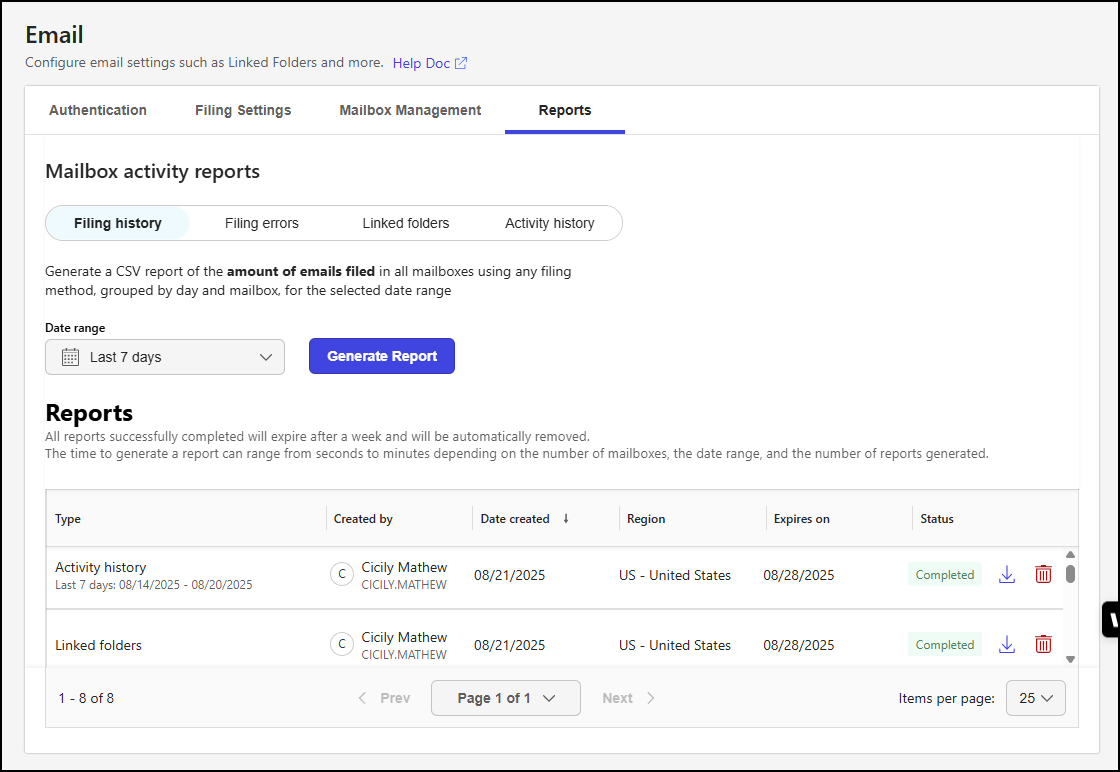
NOTE: The Reports table lists all completed reports, regardless of the report type selected in the Mailbox activity reports section.
This section includes the following topics: