Graph API permissions
Graph API permissions are required when you wish to configure any settings related to the following features:
Saving conversations to iManage Work
Saving meetings to iManage Work
The following steps explain how to grant the necessary permissions for iManage Work to access users' Microsoft Teams data using the Graph API.
Under Graph API Permissions, select Sign in to Microsoft and enter your Microsoft credentials.
In the Permissions requested dialog, select Consent on behalf of your organization, then select Accept.
These permissions are needed to retrieve the specific Graph API permissions required for the iManage Work for Microsoft Teams application to work.
The Edit Connection Settings dialog refreshes to display all of the required Graph API permissions.Figure: Edit consent dialog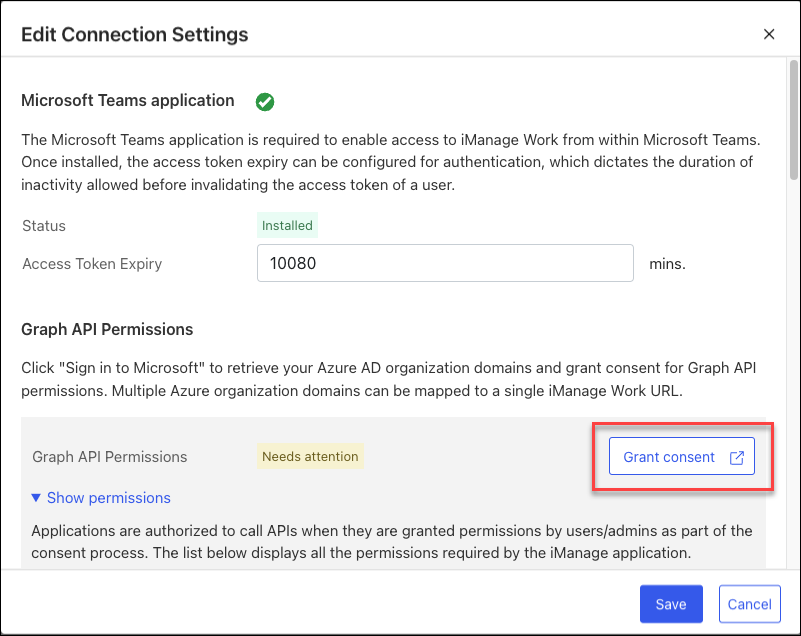
To allow iManage Work to access these features in Microsoft Teams, select Grant Consent. By granting consent, you authorize the iManage application to call APIs as required. To view the full list of Graph API permissions that the iManage app currently requires, refer to Graph API Permissions for iManage.
Sign in to Microsoft using a domain administrator account.
When prompted, select Accept. Each permission now displays a green check mark to indicate that consent has been granted.
Figure: Consent granted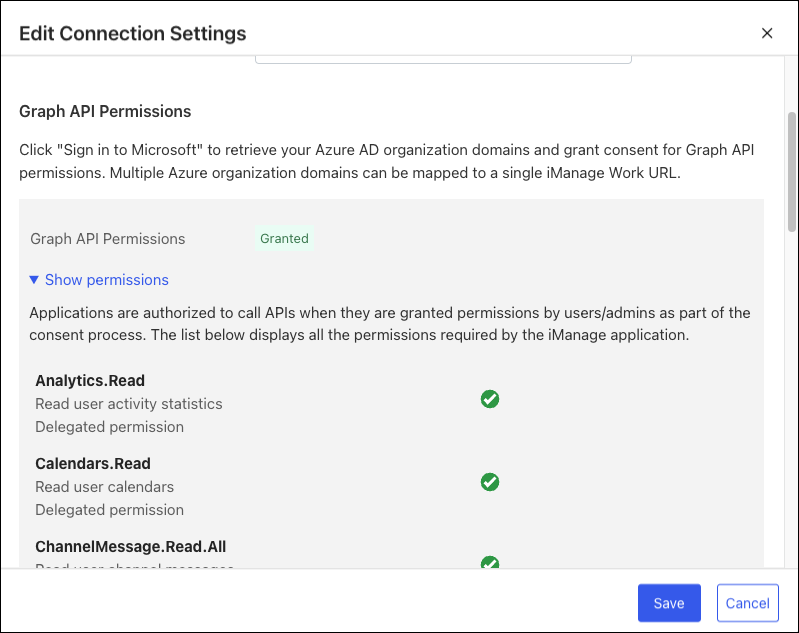
Select Save.
The iManage Work for Microsoft Teams app is now configured and ready for use. For more information about accessing iManage Work from the Microsoft Teams interface, refer to Accessing iManage Work in the Microsoft Teams interface.
Table: Graph API permissions for iManage
Permission name | Permission type | Description | Used how? |
Analytics.Read | Microsoft Graph | Read user activity statistics | Determine when users join and leave meetings as part of the save meetings feature. |
Calendars.Read | Microsoft Graph | Read events in the user’s calendar | Retrieve meetings that the user has scheduled. |
ChannelMessage.Read.All | Microsoft Graph | Read user channel messages | Save chats upon user request. |
Chat.Read | Microsoft Graph | Read user chat messages | Save chats upon user request. |
Chat.ReadBasic | Microsoft Graph | Read names and members of user chat threads | Retrieve photos and other information about the users participating in chats. |
Microsoft Graph | View users' email address | Basic user profile information. | |
Files.Read.All | Microsoft Graph | Read all files that the user can access | Retrieve files that are associated with chat threads and he application (or users) tried to save. |
Group.Read.All | Microsoft Graph | Read all groups | Retrieve the group ID associated with a team to allow saving of chats. |
offline_access | Microsoft Graph | Maintain access to data a user has given access to | Basic user profile information. |
openid | Microsoft Graph | Sign users in | Sign users in. |
profile | Microsoft Graph | View users' basic profile | Basic user profile information. |
Team.ReadBasic.All | Microsoft Graph | Read the names and descriptions of teams | Used for naming the save conversation artifact. |
User.Read | Microsoft Graph | Sign in and read user profile | Basic user profile information. |
User.ReadBasic.All | Microsoft Graph | Read all users' basic profiles | Populate information about the user in the saved PDF (who saved it, and so on). |
ApiAppRole | iManage Graph Service Web API | Grants permission to invoke the iManage REST API for Graph services. | Internal iManage permission that controls who can call our APIs to initiate saves. |
OnlineMeetingArtifact.Read.All | Microsoft Graph | Read user's online meeting artifacts | Download files and attachments associated with a meeting. |
OnlineMeetingRecording.Read | Microsoft Graph | Read all recordings of online meetings | Save recordings of meetings at the user's request. |
OnlineMeetings.Read | Microsoft Graph | Read user's online meetings | Base permission to access online meetings the user has joined. |
iManage Work Next Generation Co-authoring
The co-authoring options on adaptive cards wouldn’t be displayed to users until the iManage Work Next Generation Co-authoring application has been enabled.
To enable Next Generation Co-authoring for your users, refer to Configuring iManage Work Next Generation Co-authoring in iManage Control Center.