Reference number | Description |
|---|---|
NT-180817 | Users disabled at the library level only, and not globally, still appear as active in the Share Document dialog, but an error occurs if you try to share documents with them. |
NT-178228 | Co-authoring in iManage Work Next Generation Co-authoring with Microsoft 365 for the Web is blocked when Microsoft Cross-Tenant Access Restrictions v2, configured through Edge group policy or Intune, are in place. |
NT-175072 | When co-authoring a document shared for collaboration with both invited collaborators and internal users accessing it as standard users in iManage Work, the timeline may intermittently display the standard users' modified entries appended with "through Collaboration Link." |
NT-169937, | When multiple users are co-authoring a document simultaneously, if one or more user’s access to the document is removed or expired, their final edits get rejected once both iManage and Microsoft are aware that the user(s) access is no longer valid. Because Microsoft pushes all edits from all users as a single save, it's possible that in this scenario, edits made by still active users in the document within the same small time window may also be lost. |
NT-168679 | Intermittently, when a document is checked out by a guest collaborator, the checked-out location field may show an IP address instead of the application used. |
NT-168563 | When opening a document to edit from the document landing page, if a warning (such as the figure below) that your browser has blocked this pop-up window from opening is displayed, selecting Open Document successfully opens the document. The landing page, however, gets closed instead of remaining open. 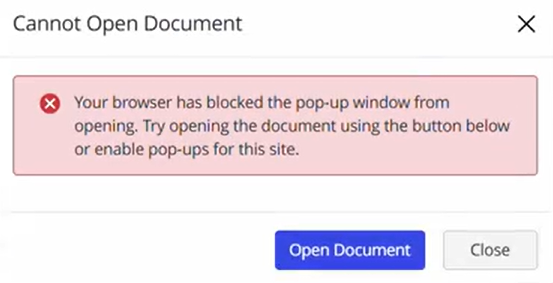 |
NT-167682 | If a user invited to collaborate on a document is set to be a Blocked user or an iManage Disabled User by the administrator, they're still displayed in the list of Shared users for the document, but with the status of Blocked. In the case that the user’s access is changed to Unblocked by an Admin, these users won't automatically be sent a link to any documents where they are now listed as active users. The link needs to be sent manually. |
NT-167488 | When guest users sign in to the iManage work web URL, they are directed to the landing page where OTP must be entered. |
NT-166465 | When accessing a document shared with you through the Gmail app on your device—if an access code is sent to you for authentication, it isn't possible to navigate back from the Access Code request page to your Gmail account to retrieve the email from your Gmail inbox. Workaround: Copy and paste the link sent to you into a new browser tab. |
NT-165855 | The new File Open dialog introduced in iManage Work 10 Desktop for Windows 10.10.0 doesn't currently support the Collaboration Links Shared Status Icon. |
NT-162540 | The feature to search for email addresses in the Last User field in Advanced Search isn't currently supported. |