iManage Next Generation Co-authoring Integration
This release of iManage Work Desktop for Windows now integrates with iManage Next Generation Co-authoring for Microsoft 365, Word, Excel, and PowerPoint lets you open documents in co-authoring mode directly from your ribbon or backstage view.
NOTE:
Next Generation Co-authoring is available only if your administrator has enabled the feature for your organization.
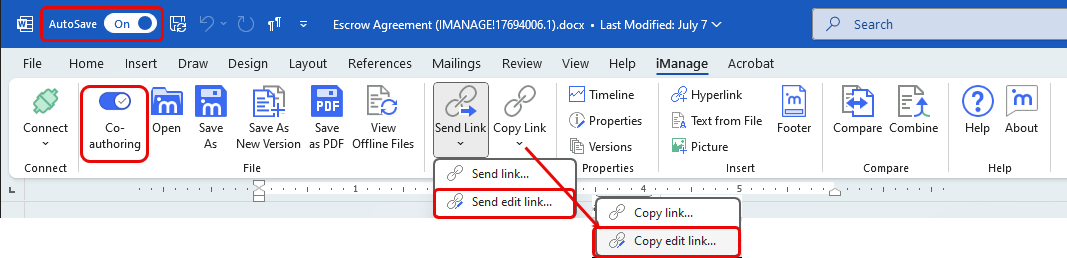
Next Generation Co-authoring improves the co-authoring experience by providing a new interface to simplify collaboration on documents with others within your organization. When a Microsoft Word Document, PowerPoint Presentation, or Excel Worksheet opens with Next Generation Co-authoring active, the ribbon changes as shown in the figure.
The benefits of Next Generation Co-authoring integration with Work Desktop for Windows include:
Open Word, PowerPoint, or Excel documents in co-authoring mode with AutoSave enabled directly within iManage Work Desktop for Windows. All changes made by collaborators are automatically saved to the file in iManage Work in real-time, ensuring seamless collaboration.
Collaborate with others in real time while using features exclusive to the desktop version of Microsoft 365 that aren't available online. Effectively manage document lifecycles by creating new versions during co-authoring sessions, ensuring that historical edits are saved.
A new toggle button on the ribbon allows you to enable or disable Next Generation Co-authoring while the document is open. This feature gives you access to the full range of functionalities available in the desktop version of Microsoft 365, enhancing the co-authoring experience.
Enhanced security and compliance measures are in place to prevent sharing with conflicting or unauthorized parties. Additionally, users receive notifications when a co-authoring session concludes.
For more information, refer to iManage Work Next Generation Co-authoring Help.
Manage Attachments
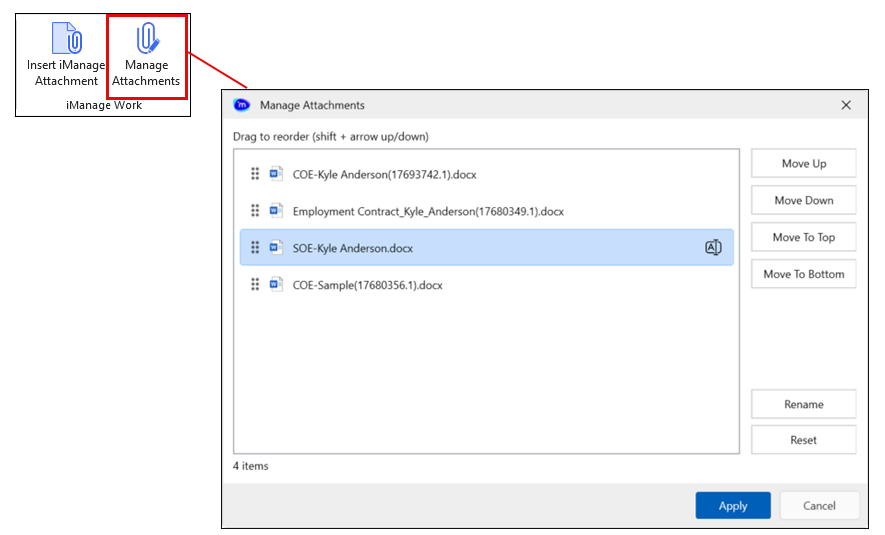
The Manage Attachments feature in the ribbon gives you a streamlined way to rename and reorder email attachments, making them more meaningful to and useful for recipients.
After launching the Manage Attachments dialog from the button, reorder, rename (without altering file extensions), or reset the email attachments using drag-and-drop, keyboard shortcuts, or on-screen buttons. The feature also emphasizes accessibility, supporting screen readers, keyboard navigation, and a resizable interface for improved usability.
For more information, refer to Managing email attachments.
Drag Documents from your Web browser to draft emails
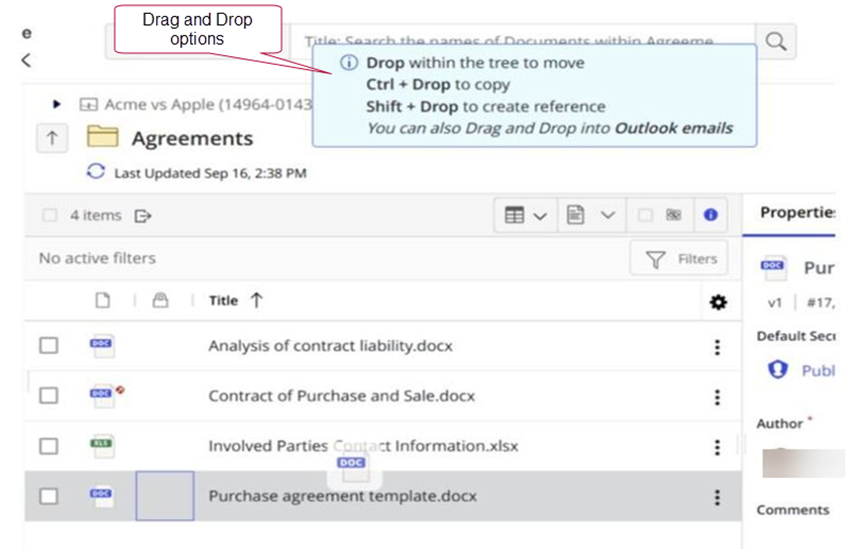
New in this release, when using Work Web, users can drag single or multiple iManage documents and links to those documents directly into email drafts, which streamlines the process of attaching single or multiple files, links, and NRL links to emails.
The single- and multiple-select support includes these actions:
Drop: attaches links (NRL and URL)
Ctrl + Drop: attaches file
Ctrl + Shift + Drop: Attaches links plus file
NOTE:
his functionality is dependent on the iManage Work environment to which you connect. The following iManage Work environment service updates or versions are required for Drag and Drop from Work Web to email drafts to be functional:
iManage Work at cloudimanage.com: This functionality is available in the September 2025 Cloud Service Update for cloud customers connecting to cloudimanage.com.
iManage Work at imanage.work: This functionality is available in the Q4 2025 Cloud Service Update for cloud customers connecting to imanage.work.
On-premises: This functionality is available with iManage Work Web Server 10.5.2.
For more information, refer to Inserting iManage Work attachments .
Support for Office TLSC 2024
Work Desktop for Windows now fully supports Microsoft Office TLSC 2024, with all the enhancements enabling users to take advantage of the new features available in Microsoft Office TLSC 2024.
Support for ARM64 processor
Work Desktop for Windows can now be installed on devices powered by an ARM64 processor, including the latest Windows laptops and tablets.