The rollout of the Public content access privilege is completed by performing these steps:
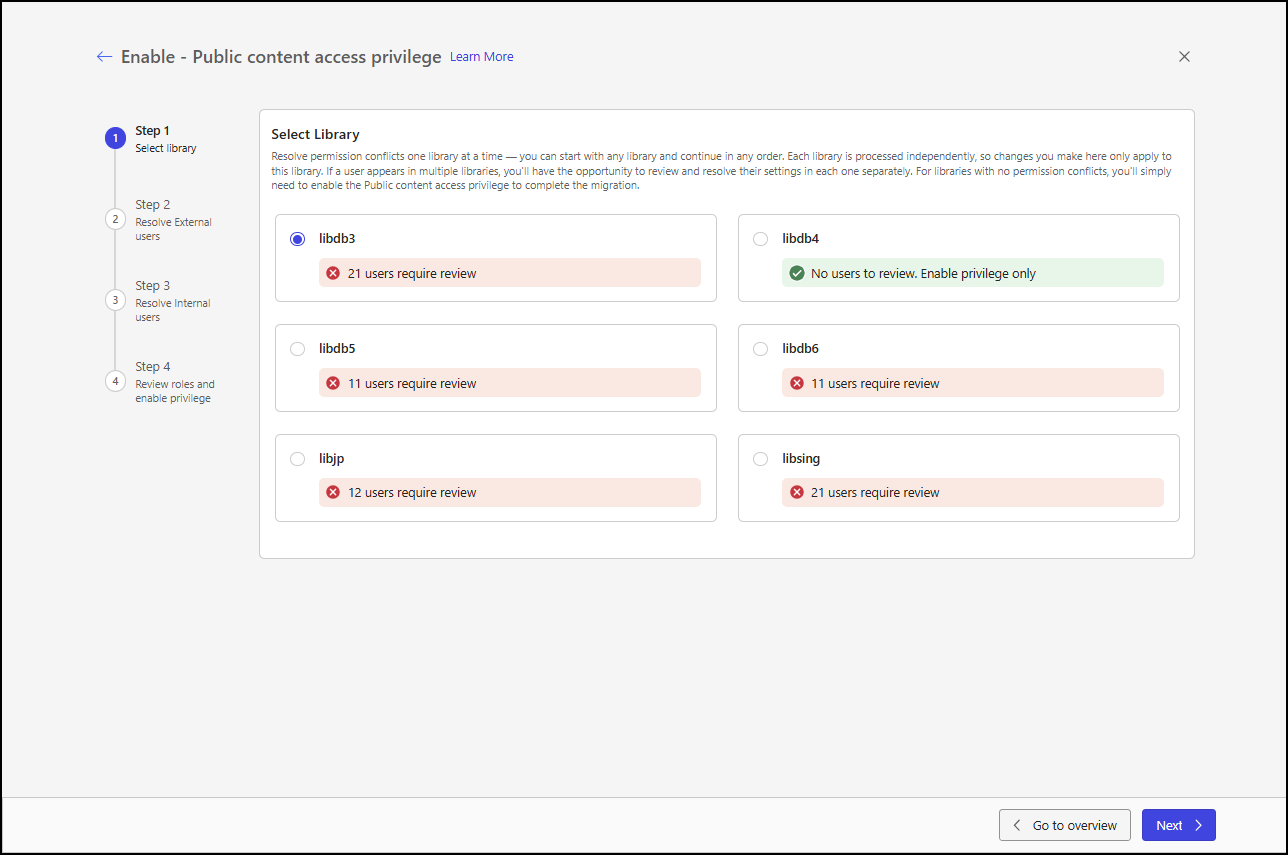
Select a library: Each of your existing libraries needs the Public content access privilege to be enabled. Libraries are processed one at a time and can be processed in any order. This step is always present in the rollout process.
Resolve conflicts with external users: If the library selected in Step 1 has any external users assigned to an internal role, you must assign them to an external role. This step is only present in the rollout process if the library has external users assigned to an internal role.
Resolve conflicts with internal users: If the library selected in Step 1 has any internal users assigned to an external role, you must assign them to an internal role. This step is only present in the rollout process if the library has internal users assigned to an external role.
Review roles and enable the Public content access privilege: This step lets you confirm that no external users are assigned to an internal role and no internal users are assigned to an external role. After you’ve confirmed this, you can enable the Public content access privilege. This step is always present in the rollout process.
The Library rollout is performed on the Enable - Public content access privilege page. Your progress through the rollout is shown in the stepper on the left side of this page. You can move between steps by selecting a step from the stepper. The stepper is shown in the following figure, where the Select library step is highlighted.
NOTE: You can move between the steps in any order. For example, if you prefer to resolve conflicts with internal users before addressing them with external users, that’s fine. However, you can’t complete the Review roles and enable privilege step if there are any unresolved conflicts with either external or internal users.
For instructions on performing each step, refer to the following sections: