You can ask questions in plain English or other supported languages instead of building Boolean or keyword queries with Ask. You don’t need to preselect documents. The AI agent finds, reads, and analyzes relevant content across the repository and returns an answer with citations to the source documents. After Ask displays answers, you can follow up with additional questions.
To start a conversation,
Browse and access Ask panel. For more instructions on how to access Ask, refer to Access Ask panel.
In the Ask anything about your content field, enter the question. For example, what is rent agreement conditions?
(Optional) If you want Ask to search the answer in a specific document or documents, select More options > Attach. Browse and select the documents.
(Optional) If you want to enhance your question, select Enhance prompt
 to enhance your question. For example, selecting the prompt might change the above question to “Identify and summarize the key conditions and obligations of the parties as outlined in the rent agreement.”
(Optional) It is possible that you may be prompted for additional inputs when asking questions. In these cases, select the relevant option or enter a prompt.
Press Enter or select Send
 .
.
Ask generates answer based on the question you have asked as shown in the following figure.Figure: Ask-generated answer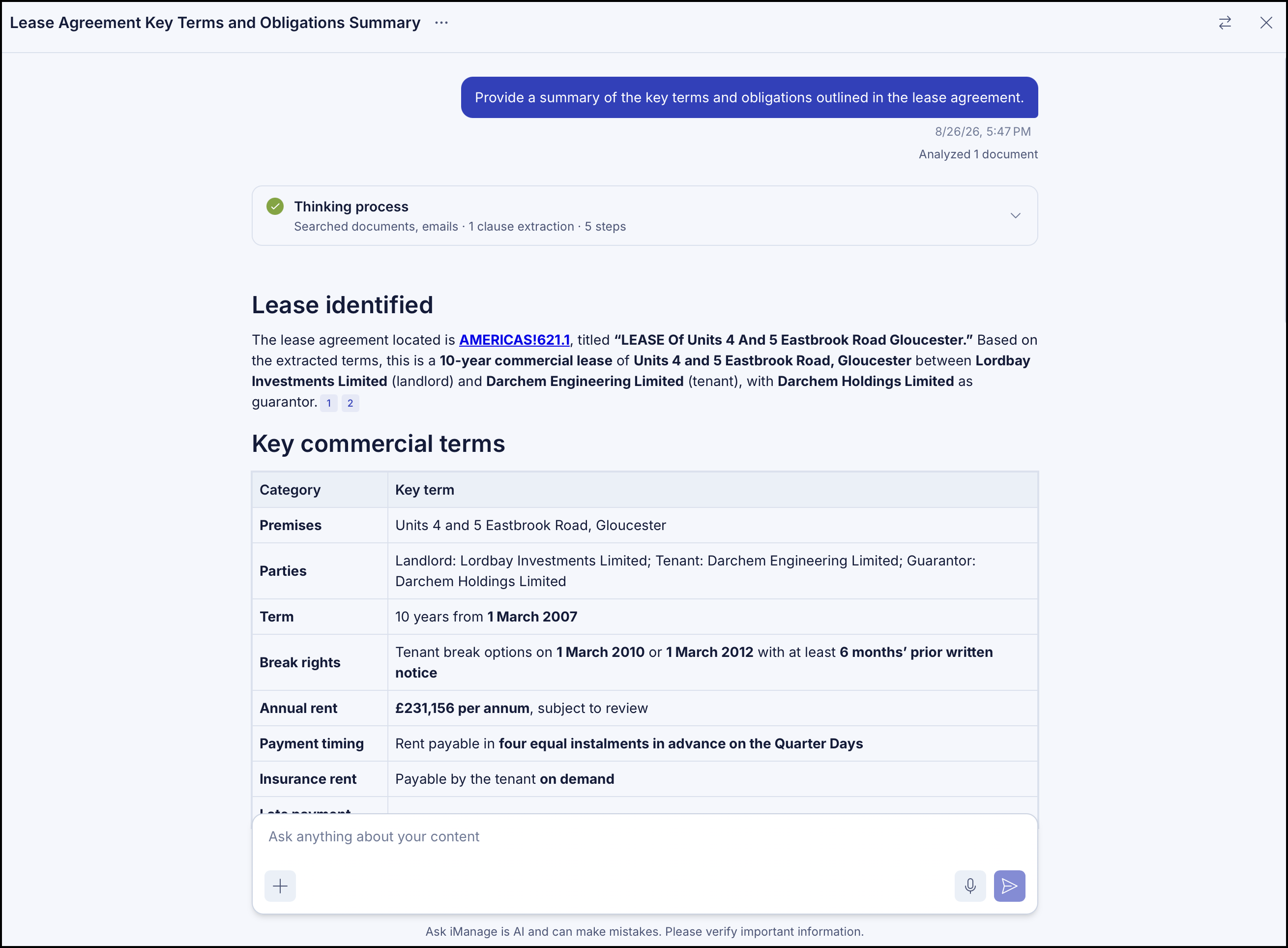
(Optional) Ask your next question in the Ask everything about content field to continue the conversation.