As an administrator for your organization, you may decrypt the table data to analyze and measure Insight+ usage patterns.
Important information
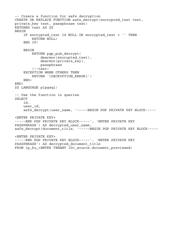
Enter the following prompts in your PostgreSQL database exactly as shown in the below example, adhering to the same format.
Replace the following in the example code snippet:
<ENTER PRIVATE KEY> with your Private key in line no. 27 and 31.
'ENTER PRIVATE KEY PASSPHRASE'with your passphrase in line no. 28 and 32.<ENTER TENANT ID> with your Insight+ Tenant ID.
Some data provided in the example code snippet isn't encrypted, for example—
id,user_id. You can view this information without having to decrypt them.Data, for example—
user_name,document_titleare encrypted and can be decrypted using the safe_decrypt command.
To decrypt the table data, for example—document_previewed , right-click the attached file > Open link in New tab > copy the text, and run the command in PostgreSQL database > Tables.