When importing metadata using SQL queries, you can optionally encrypt the SQL database password to avoid storing it in plain text. The encrypt-password mode helps prevent accidental exposure of passwords that appear in input data source files, for example, if someone opens or reviews the file.
In this mode, the password is encrypted using machine-specific properties, meaning it can only be decrypted on the same machine where it was generated. This prevents the encrypted password from being used on another system. However, as with any locally stored credential, if the host machine itself is compromised, the protected password may still be at risk.
NOTE: Using encrypt-password is optional. The previous method of storing a plain-text password in the PWD= portion of the SQL connection string in the input [DATA SOURCE FILE] is still supported and remains fully backward compatible.
The process consists of two steps:
Step 1: Generate the encrypted password
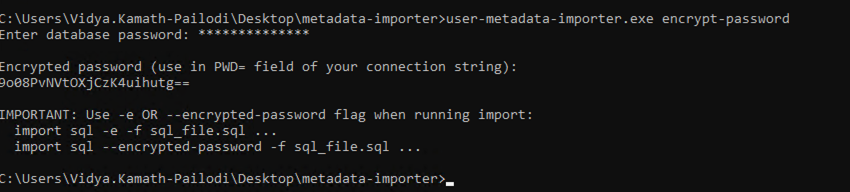
Run the User Metadata Importer with the encrypt-password option. This prompts you to enter the database password and then outputs an encrypted value.
For Windows:
.../user-metadata-importer.exe encrypt-passwordFor macOS or Linux:
.../python custom_import_properties.py encrypt-passwordWhen prompted, enter the SQL user password that you'd normally place in the PWD= portion of the SQL connection string. The tool returns an encrypted password value.
Step 2: Update the input data source file and use the encrypted password
Open the input
[DATA SOURCE FILE]that contains the SQL driver connection details.In the SQL connection string, replace the plain-text password
PWD=with the encrypted password generated in Step 1: Generate the encrypted password. When using an encrypted password, you must run SQL imports or removals with the-eor--encrypted-passwordflag so the importer knows to decrypt the password.
Example connection string:
Driver={driver for SQL server};Server=[Server Name];Database=[Database Name];UID=[SQL User ID];PWD=[ENCRYPTED SQL USER PASSWORD];SELECT userid, [Practice Area], Manager, Telephone, [Additional Locations], Department, [Job Title]FROM [Database Name].[Schema].[Table Name]Save the input
[DATA SOURCE FILE].
Windows – import (SQL mode):
user-metadata-importer.exe import sql -s [TM URL/HOSTNAME AND PORT (8090)] -f [DATA SOURCE FILE] -euser-metadata-importer.exe import sql -s [TM URL/HOSTNAME AND PORT (8090)] -f [DATA SOURCE FILE] --encrypted-passwordWindows – remove (SQL mode):
user-metadata-importer.exe remove sql -s [TM URL/HOSTNAME AND PORT (8090)] -f [DATA SOURCE FILE] --remove-properties "[METADATA FIELD(S) TO REMOVE]" -e user-metadata-importer.exe remove sql -s [TM URL/HOSTNAME AND PORT (8090)] -f [DATA SOURCE FILE] --remove-properties "[METADATA FIELD(S) TO REMOVE]" --encrypted-password macOS or Linux – import (SQL mode):
../python custom_import_properties.py import sql -s [TM URL/HOSTNAME AND PORT (8090)] -f [DATA SOURCE FILE] -e ../python custom_import_properties.py import sql -s [TM URL/HOSTNAME AND PORT (8090)] -f [DATA SOURCE FILE] --encrypted-password macOS or Linux – remove (SQL mode):
../python custom_import_properties.py remove sql -s [TM URL/HOSTNAME AND PORT (8090)] -f [DATA SOURCE FILE] --remove-properties "[METADATA FIELD(S) TO REMOVE]" -e ../python custom_import_properties.py remove sql -s [TM URL/HOSTNAME AND PORT (8090)] -f [DATA SOURCE FILE] --remove-properties "[METADATA FIELD(S) TO REMOVE]" --encrypted-password The -e / --encrypted-password flag is required whenever the password in the PWD= field was created using encrypt-password mode.
The same SQL query format can be used when removing a user account that was added to iManage Threat Manager through an import but isn't connected to an iManage Work account. Refer to Removing metadata or accidental user imports for details.
IMPORTANT: This database environment uses case-sensitive collation. All database objects (Database Name, Schema, Table Name) must be written using exact case matching. For example, [database name] is not the same as [Database Name]. Incorrect casing will result in an error.