Key concepts
Property types
To help you manage the properties available, iManage Control Center groups properties at the top of the Properties page.

All Properties
Select All Properties to view the complete list of properties available.
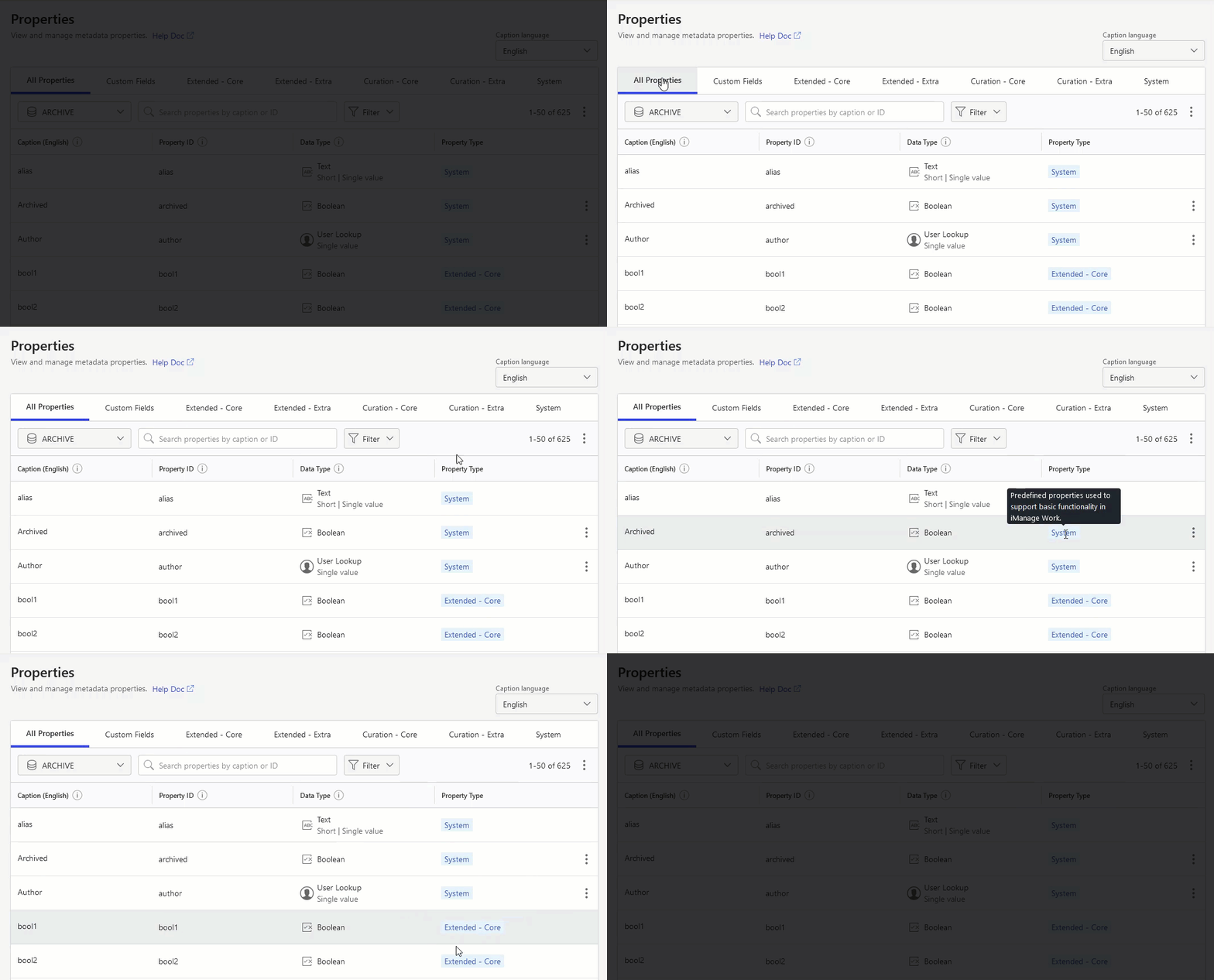
When viewing All Properties, the Property Type column displays the associated property type for each property in the list.
Figure: Viewing the Property Type
Custom Fields
Figure: Viewing Custom Fields

Select Custom Fields to display the custom1-30 properties which have always been available in iManage Work. These properties were previously listed on the Custom Fields page in iManage Control Center. These properties:
Can be used in all libraries.
Can be applied to workspace and folders as well as documents and emails.
Can be captioned.
Lookup properties can be configured to have a single value from a list.
Administrators can disable or enable lookup property values at any time. Disabling a value prevents users from applying unwanted or obsolete values to their documents and emails.
Lookup property values can only be deleted if they aren't associated with any iManage Work items.
The alias of a lookup property value can't be edited; however the description can be edited.
Custom 1–2 and Custom 29–30 have parent-child relationships.
Class and subclass
Classes and subclasses are two related properties used for categorizing or differentiating folders and documents in your iManage library. All documents and folders are required to have a class property, although a subclass is optional.
For more information about these properties, refer to Classes / Subclasses.
NOTE:
To see a list of classes and subclasses, in iManage Control Center, select Metadata > Classes / Subclasses.
To see a list of subclasses for a specific class, select a class, then select the Subclasses tab.
Extended properties
Figure: Viewing Extended properties

Extended - Core
Select Extended - Core to view the extended metadata properties of various data types. Extended - Core properties:
Can be used in all libraries, both knowledge libraries and traditional libraries.
Can be applied to documents and emails.
Can't be captioned. This will be made available in a future update.
Lookup and taxonomy properties support either a single value or multiple values.
Administrators can disable or enable lookup and taxonomy property values at any time. Disabling a value prevents users from applying unwanted or obsolete values to their documents and emails.
Lookup and taxonomy property values can't be deleted.
The alias and description of a property value can be edited.
In a future update, these properties can be displayed in the iManage Work Properties panel, in the List View and Grid View, and in the Advanced search for use by iManage Work users.
Extended - Extra
Select Extended - Extra to view the additional extended metadata properties of various data types.
These properties have the same behavior and functionality as Extended - Core properties, with the exception that they can't be displayed in the List Views and Grid Views of iManage Work.
In a future update, these properties can be displayed in the iManage Work Properties panel.
Curation Properties
Figure: Viewing Curation properties

Curation properties are only available:
If you have a valid subscription to iManage Insight+.
If you’ve selected an iManage library that’s been provisioned as a knowledge library.
Contact iManage Cloud Support to provision an existing library as a knowledge library.
Curation - Core
Select Curation - Core to view properties of various data types reserved for curating documents in a knowledge library using the iManage Insight+ Curation application and for use with iManage Insight+.
These properties have the same behavior and functionality as Extended - Core properties, but are reserved for and can only be used within a library designated as a knowledge library.
Curation - Extra
Select Curation - Extra to view properties of various data types used for curating documents in a knowledge library using the iManage Curation application and for use with iManage Insight+.
These properties have the same behavior and functionality as Curation - Core properties, with the exception that they can't be displayed in the List Views and Grid Views of iManage Work.
TIP:
For more information about using these properties, refer to Curation properties.
System
Figure: Viewing System properties

These properties are predefined and apply to all libraries, and are used in iManage Work to store information in the life-cycle of documents or emails.
alias: For documents, this text property stores the file name of the document. For emails, it stores the subject of the email.
archived: This legacy Boolean property indicates whether a document has been archived using the Monitor tool.
author: This user property stores the user name of the person who has full access to the document or email in iManage Work. It’s automatically assigned to the operator who creates a new document or initially uploads a document. The author can be changed by a document's operator or another user who has full access to the document.
checked_out: The system sets this Boolean property to yes when the document is checked out for editing by a user.
class and subclass: These two related (parent-child) properties are used to define types of documents, emails, and folders in iManage Work. You can update values for these properties in iManage Control Center by browsing to Metatdata > Classes / Subclasses.
comments: This text property stores text about a document or email in iManage Work. Users can enter additional information or instructions for the recipient.
create_date: The date and time when the document or email was created or sent. The system sets this property value. It can't be modified by a user or administrator.
database: This short text property stores the iManage Work library in which the document or email resides.
default_security: This short text property stores the type of security applied to the document, email, or container: Public, Private, View, or inherited.
For more information about these security values, refer to Container and Document Security.description: This short text property stores summary information about the document, email, or container, and is generally used to store a broader definition of the alias property.
docnum: This whole number property stores the unique number for each workspace, document, or email in iManage Work.
edit_date: The date and time when the document or email was last edited or sent. The system sets this property value. It can't be modified by a user or administrator.
has_attachment: This Boolean property stores whether the email includes one or more attachments.
in_use: This Boolean property stores whether any user has actively checked out a document for editing. iManage Work uses this information to prevent multiple users from editing the file at the same time.
in_use_by: This user property stores the user name of the person who currently has checked out the document for editing.
indexable: This Boolean property indicates if a document has been declared as a record.
is_related: This Boolean property indicates if a document is related to another document.
last_user: This user property stores the name of the user who last checked out the document.
location: This text property stores the underlying file path of the document or email stored in iManage Work.
name: This short text property stores the name of the document or container in iManage Work.
net_node: This legacy property is no longer used.
operator: A user property stores the user name of the person who created the document or initially uploaded the document or email to iManage Work.
retain_days: This number property stores the number of days before marking documents for archiving.
size: The size in kilobytes of the document or email. The system sets this property value. It can't be modified by a user or administrator.
type: The file type of the document or email stored in iManage Work, such as PPTX, PDF, or MIME. To update values for this property in iManage Control Center, browse to Metatdata > File Types.
version: This number property stores the version number for the document.
Property values
Values are the data stored in, or assigned to, a property. How values are assigned in a property is defined individually for each property. The following sections describe how values can be stored in properties.
User assigned, predefined values
For these properties, the end user selects a value from a list of predefined values. The list of values is generally defined by you, the administrator, in iManage Control Center. Lookup, taxonomy and user property types all use predefined values.
Examples of user-assigned, predefined value properties include:
custom1 / custom2
custom3-12
lookup / lookup_child
mv_lookup
extended.lookup / extended.lookup_child
extended.mv_lookup
user
class / subclass
type
To manage the predefined values for lookup and taxonomy properties in iManage Control Center, see Add property values.
User assigned, non-validated values
Other properties allow the user to enter values without selecting from a predefined list. These are called non-validated values. An example is the comments property, where a user may enter any text. Whatever text entered by the user is stored as the value.
The Data Type of the given property defines certain rules or guidelines to ensure users store values in a proper format. Examples of these data types include numbers, Boolean (yes or no), text, dates, users, email addresses, and URLs.
To learn more about the different types available, refer to Data Types.
Examples of properties that allow non-validated values include:
comments
description
location
Boolean
extended.bool
text
mv_text
extended.large_note
extended.long
System assigned
Values for system-assigned properties are assigned automatically by iManage Work.
System-assigned properties are those required for maintaining the history and nature of the object in iManage Work. For example, documents have a create date and a last edit date. Emails have a sender and recipient and sent and received dates. These values are automatically populated by the system and cannot be edited, either by users or iManage Work system administrators.
Examples of properties that store system-assigned values:
custom13
custom14
custom21
custom22
edit_date
operator
type
version
Data types
Single value or multi-value properties
Each property available in iManage Work can store either a single value or multiple values. The type of value is indicated in iManage Control Center respectively with the Single value or Multi-value label.
Figure: Single value or Multi-value properties
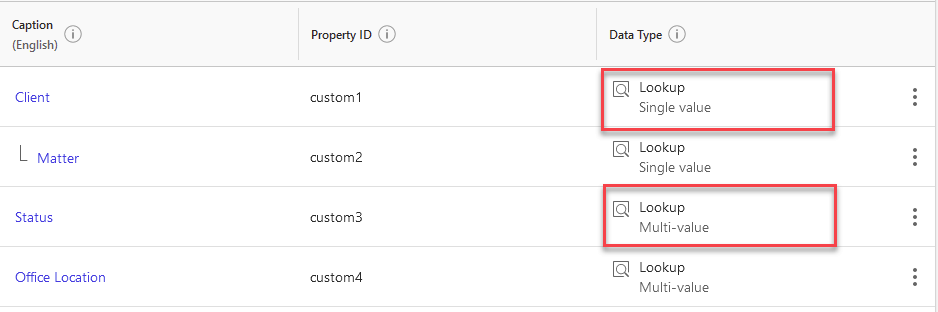
Specific lookup, taxonomy, email, text, user, and URL properties support multiple values.
NOTE:
For multi-value properties, a maximum of 25 values can be applied at any one time.
TIP:
Extended and Curation properties that support multiple values include “mv” in their name, such as mv_test1 and extended.mv_taxonomy1.
Boolean properties
Boolean properties store one of three possible values: true, false, or null. Examples include:
Property | Location in iManage Control Center |
|---|---|
archived | System tab |
checked_out | System tab |
has_attachment | System tab |
in_use | System tab |
indexable | System tab |
is_related | System tab |
custom25 | Custom Field tab |
custom26 | Custom Field tab |
custom27 | Custom Field tab |
custom28 | Custom Field tab |
bool1-5 | Extended - Core tab |
extended.bool1-5 | Extended - Extra tab |
curation.is_maintained | Curation - Core tab |
Date properties
Date properties store the year, month, day, and optionally a time in UTC format. Date ranges are not supported.
Date values are stored in ISO 8601 format, and all international date formats are supported and displayed based on the application requesting the date: DD/MM/YYYY, MM/DD/YYYY, DD/MM/YYYY Time, MM/DD/YYYY Time, and so on.
Property | Location in iManage Control Center |
|---|---|
create_date | System tab |
edit_date | System tab |
custom21 | Custom Field tab |
custom22 | Custom Field tab |
custom23 | Custom Field tab |
custom24 | Custom Field tab |
date1-10 | Extended - Core tab |
extended.date1-10 | Extended - Extra tab |
curation.last_review_date | Curation - Core tab |
curation.next_review_date | Curation - Core tab |
curation.submit_date | Curation - Core tab |
Email properties
Email property values store one or more email addresses.
Email addresses can contain a string of up to 64 characters before the @ and 64 characters after the @.
Email properties can store up to 100 email addresses.
All starting and trailing spaces are removed automatically.
Email addresses stored in this property are fully searchable.
Property | Location in iManage Control Center |
|---|---|
mv_email_address1-5 | Extended - Core |
extended.mv_email_address1-5 | Extended - Extra |
Lookup properties
Lookup properties allow administrators to create a predefined list of values. When users are interacting with these properties, they can only choose from these predefined values. They can't add or create new values for these properties.
Figure: Example of a user selecting a value for a lookup property
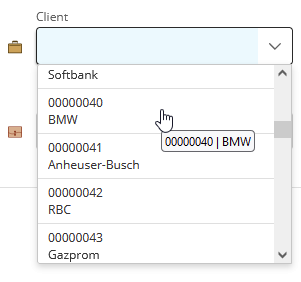
Each list item has been previously validated as an acceptable value. For instance, the property must have a list of choices previously defined for a user to assign a value to this property. The user can change their selection, but it must appear in the list.
Parent-child relationships
All single-value lookup properties have a related child property. Properties with this relationship are always displayed together on the Properties page.
Figure: Viewing parent-child relationships in iManage Control Center
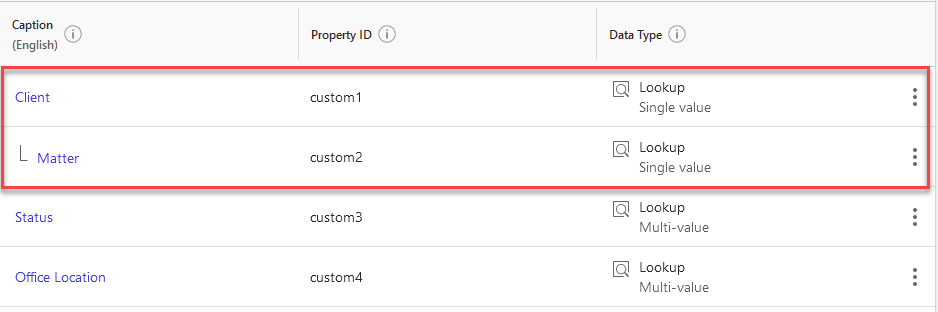
This parent-child relationship enables users to select a value from the parent, and then select from a list of related values from the child.
A common example for a lookup property in law firms is the categorization of documents by practice area and subpractice. In this example, there is a parent-child relationship between the two properties.
Practice Areas - Parent | Sub-practice - Child |
|---|---|
Banking and Finance | Acquisition finance Asset finance Bank lending Debt capital markets Derivatives Guarantees Indemnities Project finance Real estate finance |
Corporate | Corporate finance Corporate governance Corporate restructuring and bankruptcy Mergers and acquisitions (M&A) Securities and capital markets |
Environmental | Pollutant Natural resource Environmental impact assessment Environmental enforcement and litigation Environmental transactional Environmental public policy and advocacy |
This enables users of the firm to classify documents in iManage Work by selecting from a predefined list of practice areas and associated sub-practices.
TIP:
For more information about using these properties, refer to Lookup properties.
Important information about Lookup properties
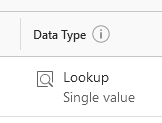
Lookup properties are displayed with the Lookup data type in iManage Control Center.
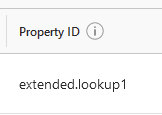
Lookup properties also include “lookup” in the property ID.
Both single-value and multi-value lookup properties are available. For more information, refer to Single value or multi-value properties.
Administrators can add, delete, disable, or modify these individual values.
Lookup property values can be imported from CSV files. For more information, refer to CSV templates.
Lookup property requirements
Custom Field lookup properties
Alias and description are required
Aliases cannot include spaces
Aliases cannot be longer than 32 characters
Descriptions cannot be longer than 254 characters
All aliases must be unique.
Aliases cannot be edited once saved.
Aliases and descriptions can be deleted, but only if the values aren't applied to any workspace, folders, documents, or emails in iManage Work.
Extended and Curation Lookup property requirements
Aliases are required.
Aliases cannot be longer than 128 characters.
Descriptions cannot be longer than 256 characters.
All aliases must be unique.
Aliases and descriptions can be edited once saved.
Aliases can only deleted when adding values initially in Draft Mode. After they have been saved, they can only be disabled.
Property | Location in iManage Control Center |
|---|---|
class / subclass | System tab |
type | System tab |
custom1 / custom2 | Custom Field tab |
custom3-12 | Custom Field tab |
custom29 / custom30 | Custom Field tab |
lookup1-10 / lookup1-10_child | Extended - Core tab |
extended.lookup1-20 / extended.lookup1-20_child | Extended - Extra tab |
mv_lookup1-20 | Extended - Core tab |
extended.mv_lookup1-20 | Extended - Extra tab |
curation.knowledge.type | Curation - Core tab |
curation.language | Curation - Core tab |
curation.state | Curation - Core tab |
Number properties
Number properties are used to store numbers. They cannot store alphabetic or special characters.
Long / Whole number
Cannot store decimal values.
Maximum value: 9,223,372,036,854,775,807.
Double / Decimal:
Can support decimal values.
Maximum value: 1.7976931348623157E+308.
Property | Location in iManage Control Center |
|---|---|
retain_days | System tab |
size | System tab |
version | System tab |
docnum | System tab |
custom17-20 | Custom Field tab |
long1-5 | Extended - Core tab |
extended.long1-5 | Extended - Extra tab |
double1-10 | Extended - Core tab |
extended.double1-10 | Extended - Extra tab |
Taxonomy properties
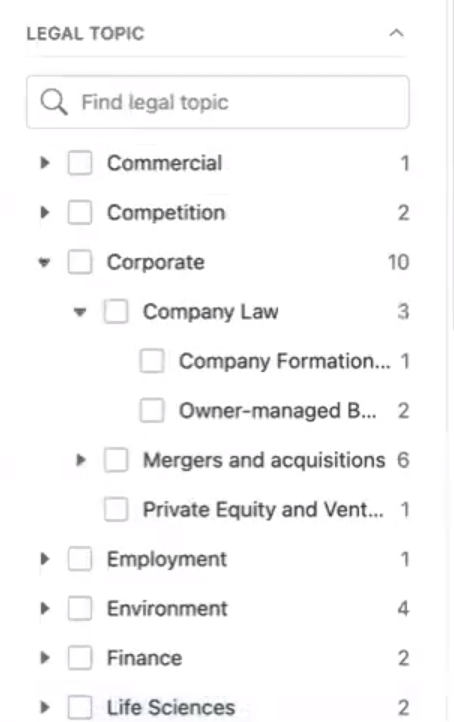
Similar to lookup properties, taxonomy properties allow users to select from a predefined list of values. A taxonomy is a hierarchical structure of nodes that categorizes data when the simple parent-child referencing supported by lookup values is not sufficient.
Taxonomy properties support four levels in this hierarchy of values. This greatly enhances search capabilities by supporting complex search queries that are more targeted and specific.
Figure: Example of a user selecting a value for a taxonomy property
TIP:
For more information about using these properties, see Taxonomy properties.
Important information about Taxonomy properties
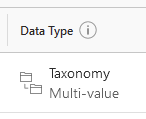
Taxonomy properties are displayed with the Taxonomy data type in iManage Control Center.
Taxonomy properties also include “taxonomy” in the property ID.
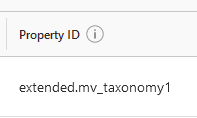
Both single-value and multi-value taxonomy properties are available for use. For more information, refer to Single value or multi-value properties.
Administrators can add, delete, disable, or modify individual values.
Taxonomy property values can be imported from CSV files. For more information, refer to CSV templates.
Taxonomy property requirements
A maximum of 4 levels or nodes is supported.
A maximum of 200 values can be created at any level or node of the hierarchy.
A maximum of 1,000 total values across all levels or notes is supported.
Aliases are required.
Aliases can't be longer than 128 characters.
Descriptions can't be longer than 256 characters.
All aliases must be unique.
Aliases and descriptions can be edited once saved.
Aliases can only deleted when adding values initially in Draft Mode. After they've been saved, they can only be disabled.
Property | Location in iManage Control Center |
|---|---|
taxonomy1-4 | Extended - Core tab |
extended.taxonomy1-7 | Extended - Extra tab |
mv_taxonomy1-10 | Extended - Core tab |
extended.mv_taxonomy1-10 | Extended - Extra tab |
curation.taxonomy1-5 | Curation - Extra tab |
Text properties
Text properties are used to store strings (characters and numbers).
All starting and trailing spaces are trimmed automatically.
Maximum size:
Short: 255 characters, including spaces.
Long: 4096 bytes
Extra Long: 16384 bytes
Property | Location in iManage Control Center |
|---|---|
alias | System tab |
comments | System tab |
database | System tab |
default_security | System tab |
description | System tab |
location | System tab |
name | System tab |
net_node | System tab |
custom13 | Custom Field tab |
custom14 | Custom Field tab |
text1-10 | Extended - Core tab |
extended.text1-10 | Extended - Extra tab |
mv_text1-5 | Extended - Core tab |
extended.mv_text1-15 | Extended - Extra tab |
extended.note1-10 | Extended - Extra tab |
extended.large.note1-5 | Extended - Extra tab |
curation.submitted_doc_id | Curation - Core tab |
curation.drafting_notes | Curation - Extra tab |
curation.mini_summary | Curation - Extra tab |
curation.other_noteworthy | Curation - Extra tab |
NOTE:
These curation properties have the following maximum sizes:
curation.drafting_notes: 4096 bytes
curation.mini_summary: 1024 bytes
curation.other_noteworthy: 1024 bytes
URL properties
URL properties store one or more URLs.
Each URL property can store up to 100 individual URLs.
Each URL can be store up to 255 characters, including the URL formatting.
All starting and trailing spaces are trimmed automatically.
The URL format is validated and an error message is returned for each invalid URL.
Property | Location in iManage Control Center |
|---|---|
mv_url1-5 | Extended - Core tab |
extended.mv_url1-5 | Extended - Extra tab |
User properties
User properties store one or more more users. These property values are prepopulated from the list of users in iManage Control Center.
When end users are interacting with these properties, they can only choose from these predefined values. They cannot add or create new values for these properties. User accounts that have been disabled cannot be selected.
Property | Location in iManage Control Center |
|---|---|
author | System tab |
in_use_by | System tab |
last_user | System tab |
user1-3 | Extended - Core tab |
extended.user1-3 | Extended - Extra tab |
mv_user1-6 | Extended - Core tab |
extended.mv_user1-10 | Extended - Extra tab |
curation.approver | Curation - Core tab |
curation.submitter | Curation - Core tab |
curation.knowledge_owner | Curation - Core tab |