In iManage Disposition Manager, any workspace, folder, or subfolder to which an unexpired hold is added isn’t destroyed. Holds can be placed on—for example, one or more workspaces or folders. Similarly, you can apply multiple holds to a workspace or folder.
You must be part of the IRM_RECORD_MANAGER group (that is, need to be a Records Manager) to create, modify, assign, or remove legal holds. You can create any number of holds (although we support 9999 holds per instance, and we don't recommend exceeding this limit).
When you apply holds, tasks are still generated and can be approved or pre-approved (based on the review mode and event configuration), but they aren't executed while the hold is active.
NOTE: Holds are active if they have no expiration date or if their expiration date has been reached.
When you apply holds, the destruction tasks for which the holds are applied aren't executed. Holds prevent documents from being declared as records.
Holds defined in iManage Disposition Manager don’t have any impact on iManage Work or iManage Security Policy Manager.
The Holds page in iManage Disposition Manager displays all the holds created.
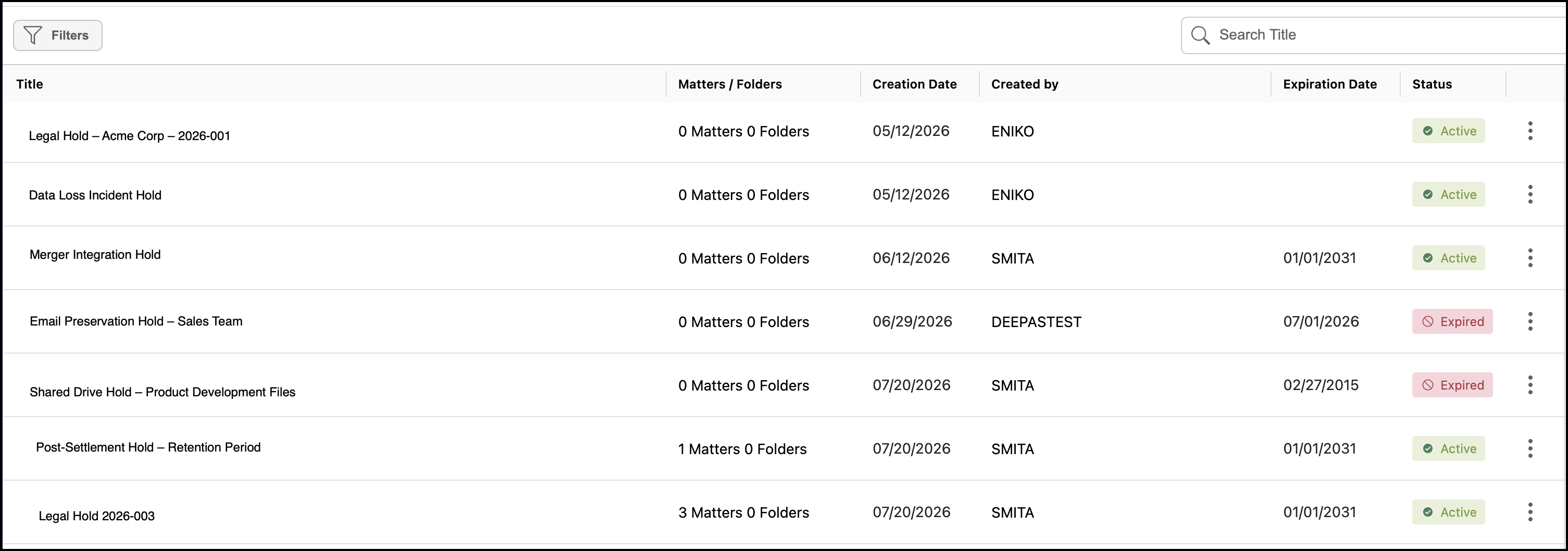
NOTE: The Title column in Holds page to display the entire title name consistent with the Tasks page, with titles truncated after three lines where necessary.
From the Holds page, you can:
You can apply or remove holds from workspaces, folders, or subfolders from the File Plan, and also view details of the holds applied. For more information, refer to the following: