iManage Control Centerのバージョンを確認する方法は?
お使いのiManage Control Centerのバージョンを確認する方法:
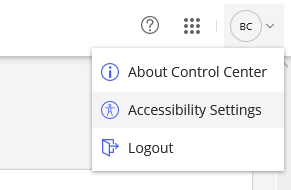
Control Centerの右上にあるユーザープロフィールメニューを選択します。
Control Centerについてを選択します。
図:ユーザープロフィールメニュー > Control Centerについて
iManage Cloudに接続している際、データセンターおよびポッドに応じてiManage Control Centerのバージョンが異なる場合があります。